Dashboard Overview
Last updated: October 6, 2026
The MyCup Dashboard is the command center for your tournament — a single screen that shows where the tournament stands, what needs doing next, and quick links into every part of the admin. This guide walks you through it.
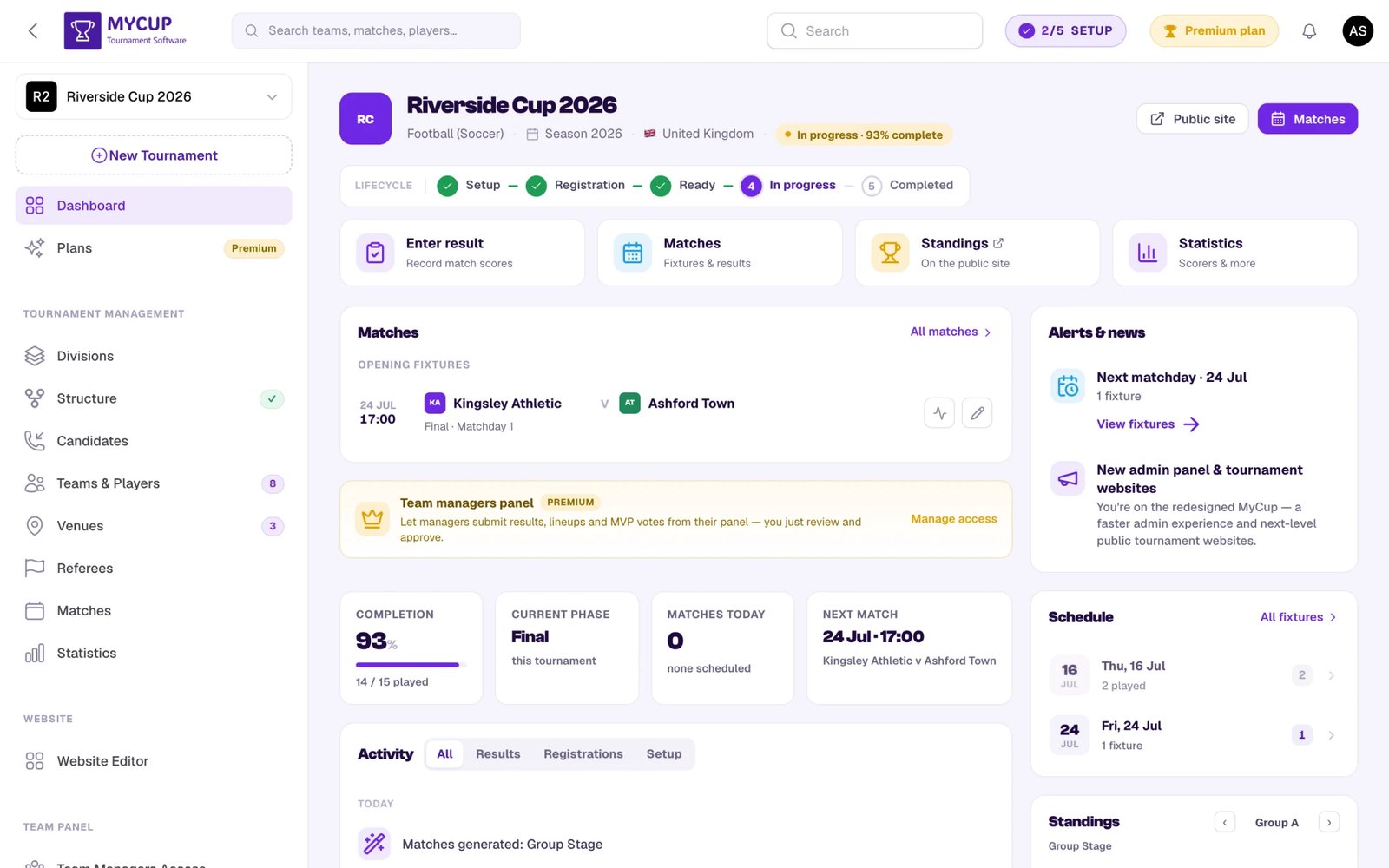
Tournament Header#
At the top you'll see your tournament's summary:
- Crest, name, sport, season and country
- A lifecycle badge ("In progress · 93% complete") showing the current stage and how far setup has come
- Header actions — a short row of shortcut buttons that adapt to the tournament's stage. Public site (open your public website in a new tab) is always there; the rest change with the lifecycle:
- Setup → Structure
- Registration → Structure plus Review sign-ups / Add teams
- Ready → Website, Structure, Teams, Matches
- In progress → Matches (jump to fixtures & results)
- Completed → All matches and Next season
Lifecycle Bar#
Just under the header, a lifecycle strip maps your tournament's journey through five states:
Setup → Registration → Ready → In progress → Completed
Completed stages show a green check; the current stage is highlighted. The lifecycle also shapes your public website — each state can show different content on the home page (for example, a countdown and a registration call-to-action before kickoff, or a champions recap once it's over).
Quick Actions#
A row of shortcut cards covers the jobs that matter most at your current stage — like the header actions, they change as the tournament progresses:
- Setup → Structure, Website, Preview site
- Registration → Add teams, Sign-ups, Structure, Website
- In progress → Enter result (with a count of matches awaiting a score), Matches, Standings, Statistics
- Completed → Winners summary / Publish summary, Statistics, Next season
Setup Progress#
Your setup status lives in two places:
- A compact setup pill in the top bar (e.g. "2/5 SETUP"). Click it to open a popover with your progress, the next step to tackle, and a View full checklist link.
- The lifecycle bar, which advances automatically as the tournament fills out.
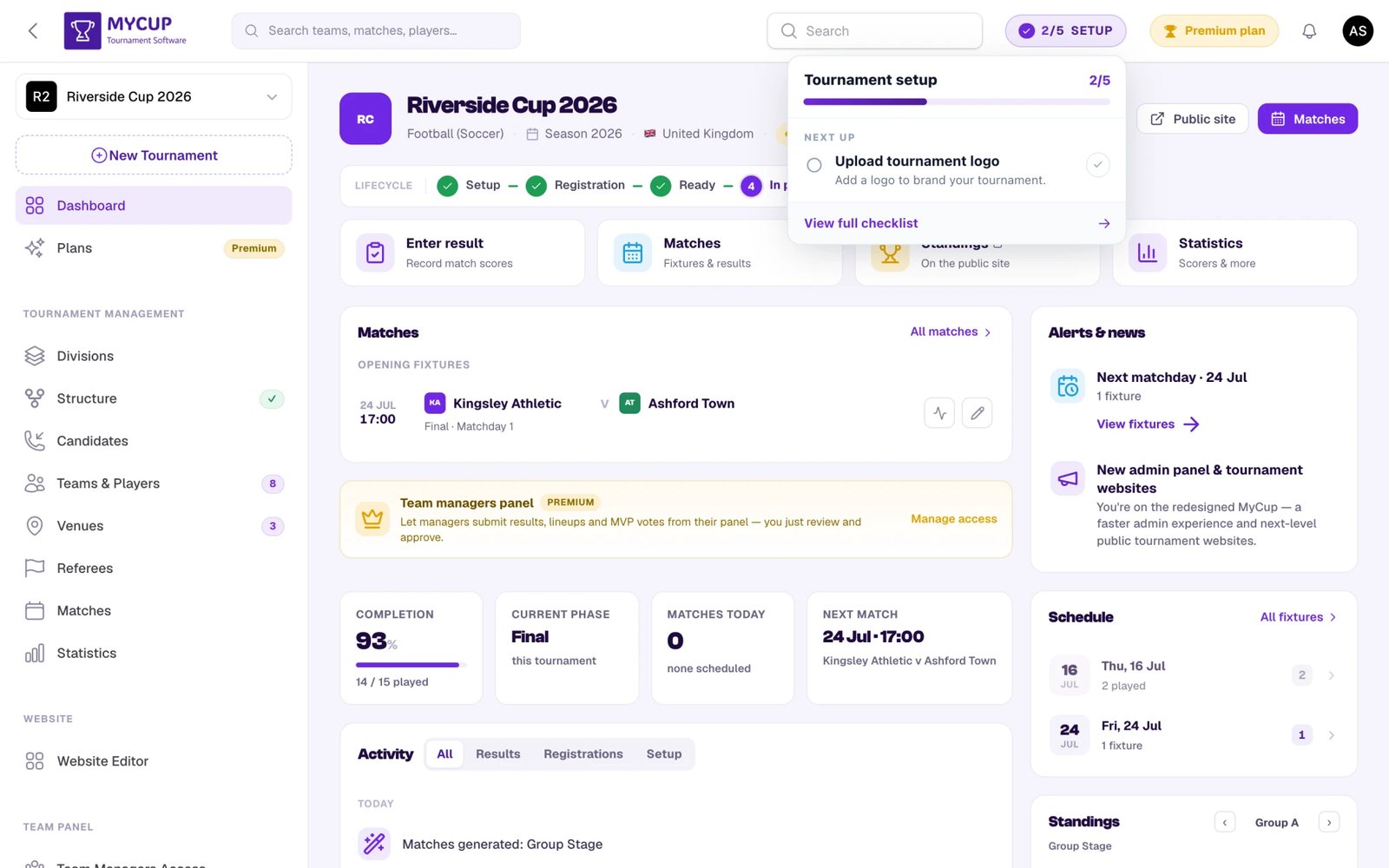
The checklist is about shaping your tournament, so it covers just five steps:
- Add tournament details — name, sport and time zone
- Upload tournament logo
- Build the structure — pick your format and lay out groups/rounds
- Customize your public website (optional) — set a theme, hero image or banner
- Configure divisions (optional, Premium) — run multiple categories such as age groups
Most steps tick automatically as their data appears; the optional non-Premium ones can also be marked done by hand. Progress is measured over the steps you can actually complete, so the Premium divisions step never blocks "setup complete."
Note: adding teams, opening public registration and generating matches are not in this checklist — they belong to the Registration stage and surface as command-center actions instead. Matches are only ever produced from the Structure page; there's no separate "create match" flow.
The Command Center#
Below the header, the dashboard surfaces everything at a glance.
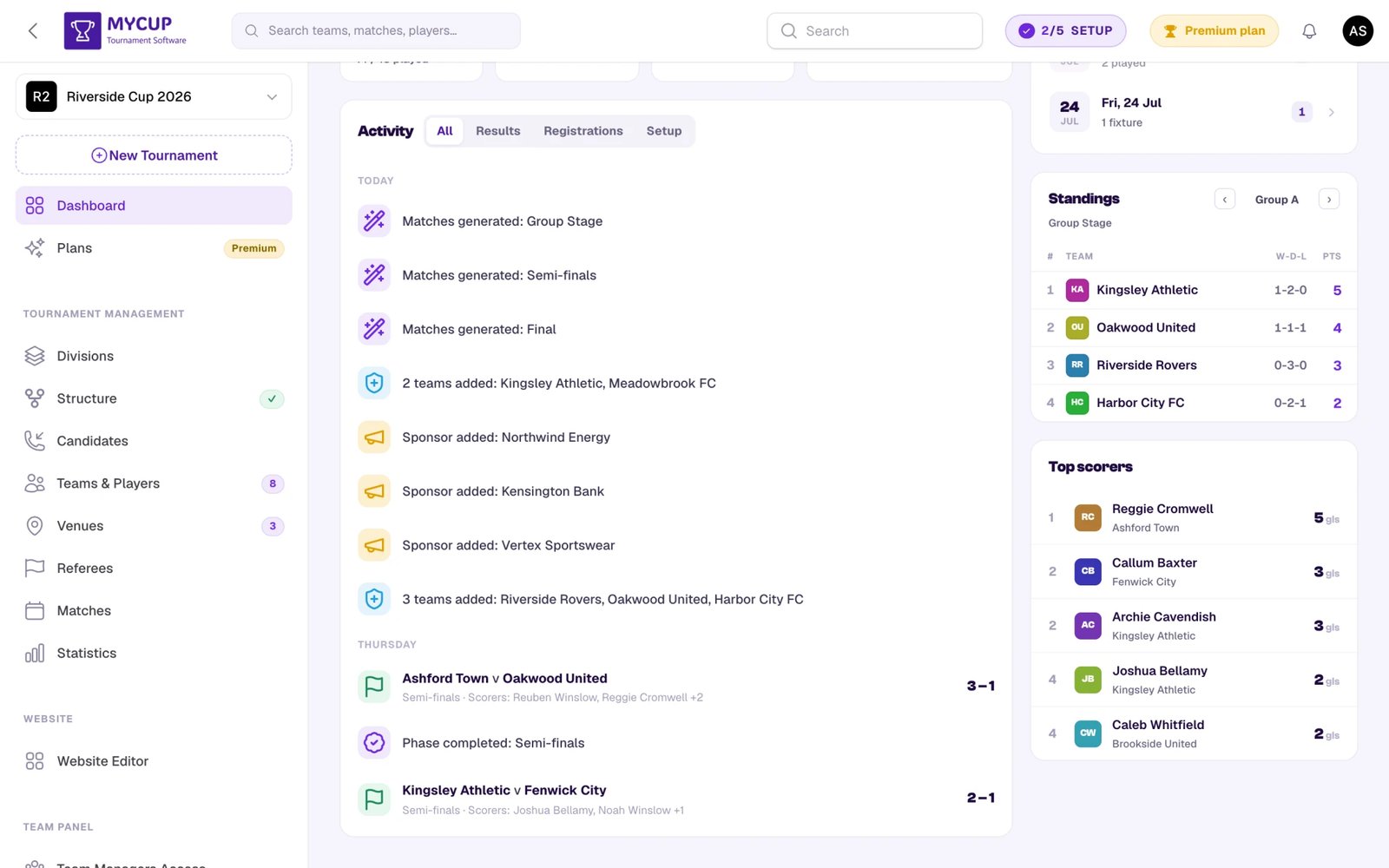
- Matches — the opening/next fixtures, each with quick live and edit result buttons, plus an All matches link.
- Alerts & news — timely nudges (next matchday, things that need attention) and product news.
- Team managers panel (Premium) — a prompt to let team managers submit results, line-ups and MVP votes from their own panel; Manage access opens the Team Panel.
- Key numbers — Completion (matches played), Current phase, Matches today, and the Next match.
- Follow-ups due — the leads whose next follow-up is overdue, today or this week, overdue first; switch between Mine and Everyone. Hidden when nothing is due. See Sales pipeline.
- Finances — on plans with Finances, the card also shows your sales Pipeline and Confirmed value.
- Activity — a feed of recent changes (results entered, registrations, structure updates), filterable by All / Results / Registrations / Setup. Extra tabs appear once a tournament has that kind of activity: Documents, Roster (player and staff changes made by clubs in the Team Panel) and Forms. Club activity is grouped one row per day and names the clubs, who did it and what — so "9 documents uploaded" tells you which clubs and which files, not just a number.
- Schedule — a compact list of match days with counts; click a day to drill in.
- Standings — a mini table for the current phase/group, with arrows to page through groups.
The command center is sport-aware: for individual sports (boxing, chess, tennis, etc.) the labels switch to "Participant", and blocks that don't apply (top scorers, team-manager activity) are hidden.
Sidebar Navigation#
The left sidebar groups every feature:
| Section | Pages |
|---|---|
| (top) | Dashboard, Plans |
| Tournament Management | Divisions, Structure, Teams & Players, Venues, Referees, Matches, Statistics |
| Sales | Candidates, Registration form |
| Website | Website Editor, Sponsors, Documents |
| Team Panel | Team Managers Access, Custom Forms, Announcements, Settings |
| Finances | Finances, Fees, Booking forms |
| Hospitality | Accommodations, Allocation, Rooming lists, Meals |
| System | Tournament Settings, Custom Attributes, Import teams & data, Admin Users (your organiser team, invitations and roles) |
Use the tournament switcher at the top of the sidebar to move between tournaments, or New Tournament to start another one.
Plan-Gated Items#
Features that aren't on your current plan still stay visible in the sidebar so you can see what upgrading unlocks. Opening one takes you to the Plans page (with a short note that the feature needs a higher tier) rather than blocking you outright:
- Statistics (Pro & Premium) — always listed; the page itself shows an upgrade prompt if your plan doesn't include it.
- Divisions (Premium) — opening it on a lower plan bounces you to Plans with a "Divisions is a Premium feature" note.
- Team Panel group — Team Managers Access, Custom Forms, Announcements, Settings (all Premium) — same soft-gate to Plans.
Sponsors are a Premium feature too, but they live inside the Website Editor (as a block you add to the public site), not as a sidebar item.
Plans Badge#
The Plans item always shows your current tier as a badge — Free in blue, Pro or Premium in gold. Open Plans for the comparison table, your usage, and purchase history.
Your Account Language#
The language of the admin and Team Panel is a personal setting — each user picks their own, so two people managing the same tournament can each work in their own language.
- Where: user menu (top right) → Profile → Language, then save.
- Smart default: if you've never chosen, MyCup uses your device language when supported, otherwise English.
- Emails too: invitations, reminders and digests arrive in your account language.
- Separate from the website: the public tournament website has its own language, set per tournament in the Website Editor.
Supported panel languages: English, Español, Português, Deutsch, Français, Italiano, Polski, Русский.
Mobile Access#
The dashboard is fully responsive — you can manage your tournament from a phone or tablet, not just a laptop.
Was this page helpful?
Let us know if you found this documentation helpful or if you have suggestions for improvement.