
Understanding Tournament Plans
Open in StudioOn this page
MyCup offers three tournament plans — Free, Pro, and Premium — designed to match tournaments of different sizes and ambitions. Plans are one-time purchases with lifetime access; you can upgrade at any time and your existing data is always preserved.
Available Plans#
Tournament Free — €0.00#
For small tournaments, first tests, or trying out MyCup. No payment card required.
Features:
- Basic tournament setup
- Up to 8 teams & participants
- Public tournament page
- Tournament statistics & insights
- MyCup watermark on public pages
Free tournament limit: you can have up to 10 active free tournaments at the same time. Finished/archived tournaments and paid tournaments don't count. To free up a slot, finish, delete, or upgrade one of your active free tournaments. Paid tournaments have no such limit.
Tournament Pro — €50.00#
For clubs and local organizers running regular tournaments.
Features:
- Flexible tournament builder
- Up to 50 teams & participants
- Custom branding (your own hero image, app icon and logos)
- Documents — publish up to 5 files (rulebook, schedule & forms)
- Public sharing & spectator access
- Tournament statistics & insights
- Spreadsheet import for teams, players, staff, venues & referees
- Finances — fees, payments and reminders
- Email support (SLA 2 days)
Tournament Premium — €150.00#
For large events, federations, and tournaments with advanced needs.
Features:
- Up to 500 teams & participants
- Full customization of tournament structure
- Advanced branding
- Documents & sponsors on the public website — up to 20 files
- Up to 10 custom divisions & advanced management
- Tournament statistics & insights
- Team Managers Panel — rosters, registrations & communication
- Player & staff documents — collect ID scans and certificates
- Accommodation & meals — hotel rooms, rooming lists & catering headcounts
- Hall screens, match assignments and a custom website address
- Spreadsheet import for teams, players, staff, venues & referees
- Finances — fees, payments and reminders
- Priority support (SLA 12 hours)
- Feature customizations on request
Comparing Plans on the Plans Page#
Inside your dashboard, the Plans page (/plans) opens with a header showing Your plan, how much of its team and division limits you are using, and, unless you are already on the top plan, an Upgrade to button for the next plan up plus Compare all plans. Below it, a side-by-side Compare plans table shows all three tiers. The comparison is grouped into Limits (teams, divisions, documents), Website & design (image uploads, backgrounds & colours, custom branding, sponsors, hall screens, custom website address), Teams & data (team panel, player documents, spreadsheet import, finances, match assignments) and Support. Your plan is marked Current plan, the top plan Recommended, every plan above yours has an Upgrade button with its price, and plans below yours read Downgrade unavailable. On a phone the table becomes one card per plan. Your Purchase history is listed below, where you can download each invoice as a PDF.
While a new season runs on its 30-day trial of the previous season's plan, the header says so, shows when the trial ends and offers Buy for that plan. See Start next season.
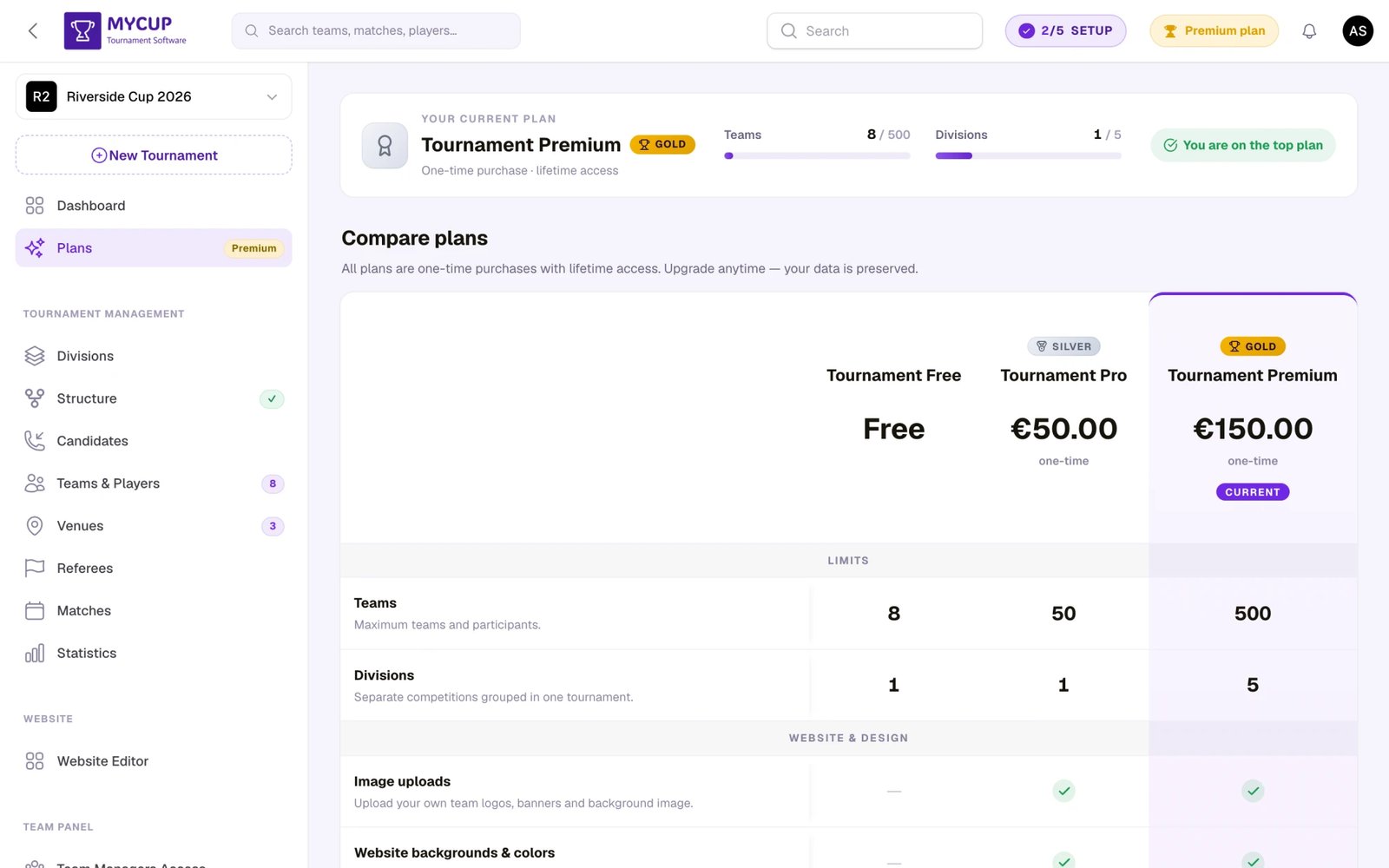
To open it, click Plans in the sidebar — the badge next to the menu item shows your current tier (a blue Free tag, or a gold Pro / Premium tag on a paid plan).
What Happens on a Lower-Tier Plan#
Features that aren't available on your current plan stay visible in the sidebar so you can see what you'd unlock by upgrading. Sponsors and Documents carry a badge naming the plan that unlocks them, and Divisions stays in place. A whole paid module (Team Panel, Finances, Hospitality) shrinks to a single link with a plan badge instead of its separate pages. Opening a locked item takes you to the Plans page with a short note about which feature you tried to access — so you can compare plans and upgrade if it makes sense. Nothing is hidden from you; the higher-tier tools are simply gated until you upgrade.
The following features are gated by plan:
| Feature | Required Plan | What it unlocks |
|---|---|---|
| Documents | Pro or Premium | Publish your rulebook, schedule, entry forms and venue info for teams to download |
| Finances | Pro or Premium | Track entry fees, record payments, and chase unpaid balances with automated reminders |
| Player documents | Premium | Collect and store documents (ID, medical certificate, waiver) against individual players |
| Sponsors | Premium | Showcase sponsor logos on your public tournament site |
| Hall screens | Premium | Live results on a projector or TV in every venue. See Hall Screens |
| Match assignments | Premium | Give each match to a person, and limit volunteers to the matches they run. See Assigning Matches to People |
| Custom website address | Premium | Choose your own address, like mycup.me/tournament/my-cup, in the Website Editor under Settings. An address you chose keeps working after a plan change; changing it again needs Premium. See Website Editor |
| Divisions | Premium | Organise teams by age group, skill level, or category |
| Team Panel (Team Managers Access, Custom Forms, Announcements, Settings) | Premium | Self-service portal where teams manage their own info, rosters, and communication |
| Hospitality (Accommodations, Allocation, Rooming lists, Meals) | Premium | Hold hotel rooms, put every travelling group in a bed, send rooming lists and count meals. See Hospitality |
| Custom branding | Pro or Premium | Your own hero image, app icon, no MyCup watermark (every theme and color scheme is free on all plans) |
| Team & participant logos | Pro or Premium | Upload logos for teams and individual participants |
| Spreadsheet import | Pro or Premium | Bulk-add teams, players, staff, venues and referees from an Excel or CSV file |
If team managers try to log into the Team Panel for a tournament that doesn't have the Premium feature, they'll see a message explaining the panel is unavailable on the current plan.
Choosing the Right Plan#
Consider these factors:
- Size — How many teams or participants will compete? (Free 8, Pro 50, Premium 500.)
- Branding — Do you need your own hero image, a custom app icon and a watermark-free public site?
- Sponsors — Will you showcase sponsor logos publicly? (Premium only.)
- Divisions — Do you need separate brackets for different age groups or skill levels? (Premium only.)
- Team self-service — Do you want teams to manage their own rosters and respond to forms via the Team Panel?
- Money — Will you track entry fees and chase unpaid balances? (Pro and Premium.)
- Player paperwork — Do you need to collect ID, medical certificates or waivers per player? (Premium only.)
- Support level — Community / email (SLA 2 days) / priority (SLA 12 hours) / custom features on request.
Key Features Explained#
Tournament Statistics & Insights (All Plans)#
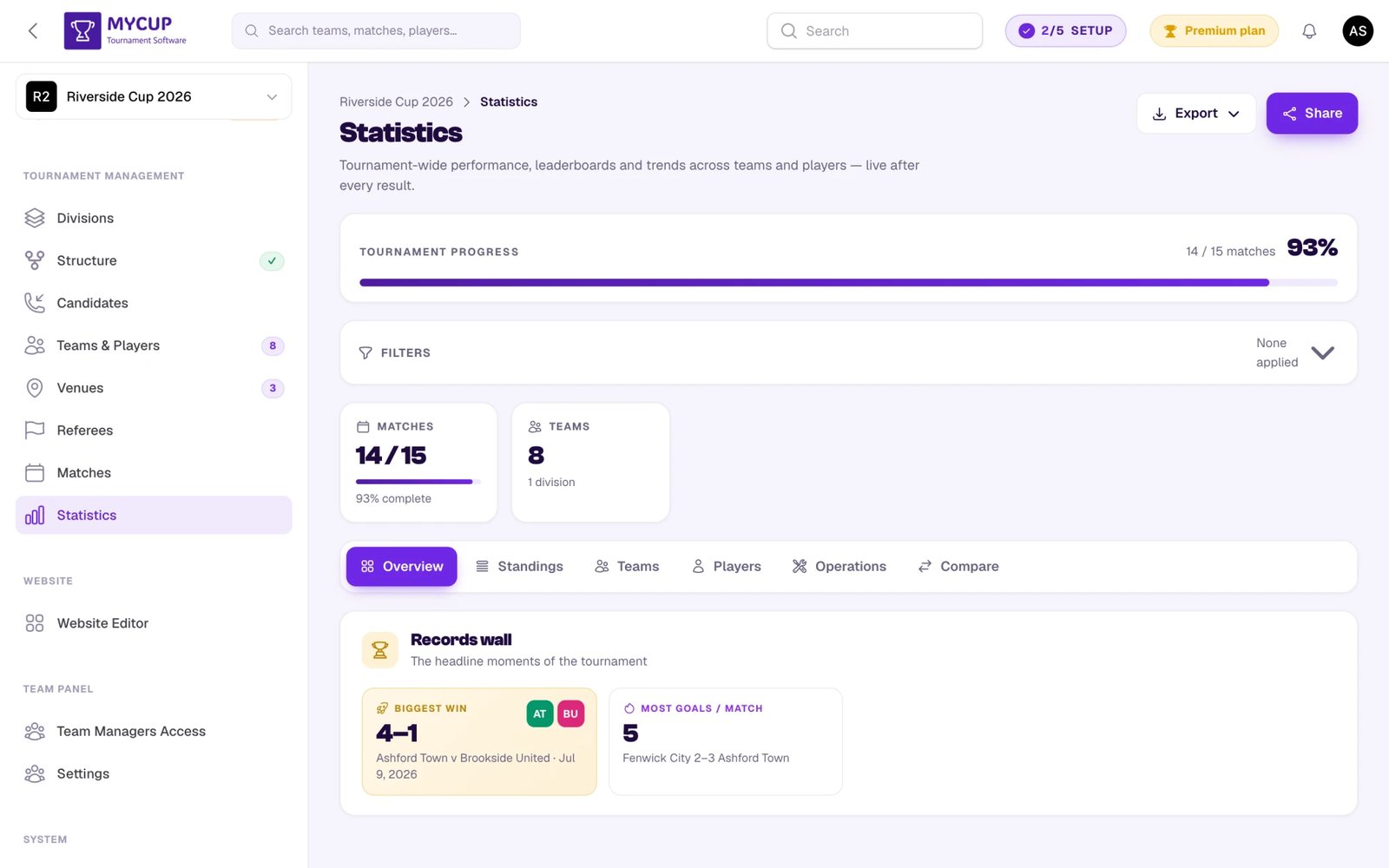
Every plan, Free included, carries the Statistics page in your dashboard with live leaderboards, top scorers, top assists, fair-play tables, MVPs, suspension watch, and per-matchweek goal/match volume charts. Filter by phase, date range, or in-progress matches.
Documents (Pro or Premium)#
Publish your rulebook, match schedule, entry forms and venue information on your tournament website, so you stop emailing the same PDF to every team manager. Upload files directly, or link to files you already keep in Google Drive or Dropbox. Manage them under Website > Documents, where you can also see and control whether the page is live and whether it appears in your site menu.
Your plan sets how many documents you can publish: Pro publishes up to 5, Premium up to 20. See the Documents guide for allowed file types, size limits and how visibility works.
Sponsors Placements (Premium)#
Display sponsor logos on your public tournament website. Manage them under Website > Sponsors or in the Website Editor — upload logos, link them to sponsor websites, control display order, and toggle individual sponsors on or off. Sponsors are a Premium feature.
Custom Divisions (Premium)#
Group your teams into separate divisions — by age group, skill level, gender, or any other category — and run an independent tournament structure inside each one. Premium carries up to 10 divisions in one tournament.
Team Panel (Premium)#
A dedicated self-service portal for team managers covering:
- Team info editing (name, logo, contact details)
- Roster and staff management
- Document uploads
- Custom forms requested by the organizer
- Announcements with acknowledgment tracking
See the Team Panel documentation for details.
Spreadsheet Import (Pro & Premium)#
Upload an Excel or CSV file of teams, players, staff, venues or referees instead of adding them one at a time. MyCup gives you a template shaped to your tournament (including your custom attributes and divisions), matches your column names to its own, and imports in the background.
Re-uploading the same file updates what you already have rather than duplicating it, and any import can be undone for 7 days. See Importing from a Spreadsheet.
Finances (Pro & Premium)#
Track what each participant owes and what they have paid — entry fees, instalments, refunds. Define a fee once and bill a division or the whole roster in one action, give charges a deadline, and let MyCup send automated reminders in your tournament's name while a balance stays unpaid. It is a ledger, not a payment processor: money still moves by bank transfer or cash and you record what happened.
Finances also unlocks the money side of the sales pipeline: each lead's value, pipeline / confirmed / collected totals, default prices, expected revenue and booking forms for leads. Sources, owners, follow-ups, lost reasons and conversion work on every plan.
See Tracking Payments and Payment Reminders.
Player Documents (Premium)#
Collect and store documents against individual players — ID, medical certificate, parental consent — instead of keeping them in an inbox. Team managers can upload them from the Team Panel.
Custom Branding (Pro & Premium)#
Put your own hero image and app icon on your public tournament website and remove the MyCup watermark. Pro and Premium both include all branding options. Every theme style, color scheme and sample background is free on all plans.
Team & Participant Logos (Pro & Premium)#
Upload custom logos for teams and individual participants. Adds visual identity, professional polish, and helps spectators find their team faster.
Upgrading Your Plan#
You can upgrade at any time:
- Open the Plans page from the sidebar.
- Click Upgrade to plan in the header, or the Upgrade button of any plan above your current tier in the comparison.
- Complete checkout (Stripe / Paddle / Lemon Squeezy / Offline).
- New features are available immediately. All existing data — teams, matches, results, settings — is preserved.
An upgrade is charged at the full price of the new plan. What you already paid for your current plan is not credited against it and is not refunded. The exact amount is always shown before you pay. Downgrades are not available, so pick your tier with that in mind.
There is no downtime, no setup fee, and no recurring billing. All plans are one-time purchases.
Plan Comparison#
| Feature | Free | Pro | Premium |
|---|---|---|---|
| Price | €0.00 | €50.00 | €150.00 |
| Teams & participants | Up to 8 | Up to 50 | Up to 500 |
| Tournament builder | Basic | Flexible | Full customization |
| Public tournament page | ✓ | ✓ | ✓ |
| Team & participant logos | — | ✓ | ✓ |
| Spreadsheet import (teams, players, staff, venues, referees) | — | ✓ | ✓ |
| Website themes, color schemes & sample backgrounds | ✓ | ✓ | ✓ |
| Custom branding (your hero image, app icon) | — | ✓ | ✓ |
| MyCup watermark removed | — | ✓ | ✓ |
| Tournament statistics | ✓ | ✓ | ✓ |
| Documents (rulebook, schedule, forms) | — | 5 | 20 |
| Finances (fees, payments, reminders) | — | ✓ | ✓ |
| Player documents | — | — | ✓ |
| Sponsors placements | — | — | ✓ |
| Hall screens (live results on a projector) | — | — | ✓ |
| Match assignments | — | — | ✓ |
| Accommodation & meals | — | — | ✓ |
| Custom website address | — | — | ✓ |
| Custom divisions | — | — | Up to 10 |
| Team Panel (self-service) | — | — | ✓ |
| Public sharing & spectator access | — | ✓ | ✓ |
| Support | Community | Email (SLA 2 days) | Priority (SLA 12 hours) |
| Custom features on request | — | — | ✓ |
Frequently Asked Questions#
Can I change plans later? Yes — upgrade any time from the Plans page. Plans are one-time purchases, so upgrading just unlocks the new tier on top of what you already have.
I have 60 teams in a spreadsheet. Which plan do I need? Pro covers up to 50 participants, Premium up to 500 — so 60 teams needs Premium. Spreadsheet import itself is available on both. If a file has more rows than your plan has room for, the whole file is rejected and the message tells you how many slots remain, so you never end up with a half-imported tournament.
What happens to my data when I upgrade? All your tournament data — teams, matches, results, structure, settings — is preserved on every upgrade.
Are there setup fees or recurring charges? No. Every plan is a one-time payment with no setup fees, hidden charges, or subscriptions.
Can I downgrade? Downgrades aren't supported through the dashboard. On the Plans page, plans below yours read Downgrade unavailable instead of offering a button.
I opened a feature but it asks me to upgrade — what's happening? That's the soft-gate behaviour: features above your tier stay visible so you can see what's available, and opening one takes you to the Plans page with a note about which plan unlocks it. Nothing is hidden from you.
Can I add sponsors on the Pro plan? No — sponsors are a Premium-only feature. You add them under Website > Sponsors once you're on Premium. Documents — your rulebook, schedule and forms — are available on Pro and Premium.
Is Statistics included on the Pro plan? Yes — and so does Free. Statistics is a baseline feature on every plan, so leaderboards and trends are never gated.
Is the Team Panel included on the Pro plan? No — the Team Panel is a Premium-only feature.
Is there a limit on the number of sponsors I can add? There is no fixed sponsor cap on Premium. Contact support if you have a very large sponsor portfolio.
Is there a limit on how many free tournaments I can have? Yes — you can have up to 10 active free tournaments at once. Finished/archived tournaments and paid tournaments don't count toward that limit, so a slot frees up when you finish, delete, or upgrade one of your active free tournaments. Paid tournaments have no such limit.