
Hospitality
Open in StudioOn this page
Premium feature. Hospitality is available on the Tournament Premium plan. Tournaments on Free or Pro see a single Hospitality link in the sidebar with a Premium badge, which opens the Plans page.
Who can open it. Because rooming lists hold ID numbers and dates of birth, the four pages also need the hospitality permissions, not just the plan: view hospitality to open them and update hospitality to change anything. The tournament Administrator role has both. A custom role without them does not see the pages; one with view but not update sees them read-only.
If you run a festival, the competition is only half the job. The other half is a spreadsheet: which property is holding how many twins, which club sleeps where, who is in room 214, and how many people sit down to lunch on Saturday.
Hospitality replaces that spreadsheet — and keeps it honest, because every number you see is counted from the bookings you actually made rather than typed in twice.
The four pages#
The sidebar group Hospitality holds four pages, meant to be worked in this order:
| Page | What you do there |
|---|---|
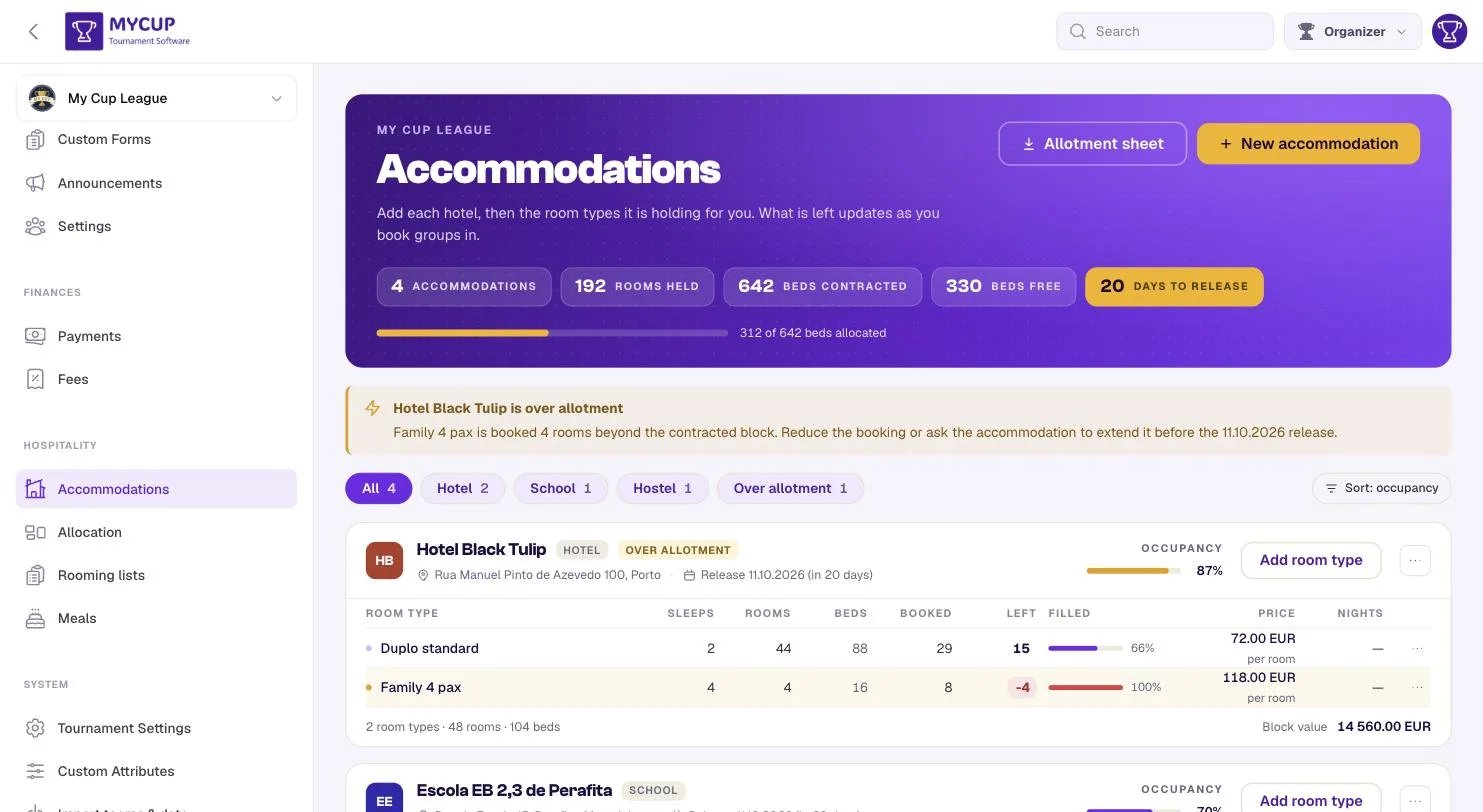
| Accommodations | Add each property and the room types it is holding for you |
| Allocation | Say who is travelling, and put each group into a bed |
| Rooming lists | Name who sleeps in each room, then send one sheet per property |
| Meals | Add a sitting for each meal of each day and record who is eating |
You do not have to use all four. A tournament that only feeds people can use Meals alone; one that only books beds can stop after Allocation.
Each page opens with the same header: its key figures (the one in gold is the one to watch: days until rooms are released, groups without a bed, people missing papers), the page's main action, and a ? button that explains the page in three steps and links back to this guide.
Two presses that do the boring part#
Most of the work in a festival's accommodation is mechanical, and two buttons do that part:
- Auto-allocate on Allocation puts every group that has no bed into one.
- Auto-fill on Rooming lists seats every squad from the roster the club already typed.
Both are deliberately cautious. Neither overbooks a property, neither moves anything you have already arranged, and both name what they could not do instead of quietly doing something approximate. You can press either at any point without checking the result afterwards.
The idea behind it: groups, not teams#
The thing that stays in a property is a group, not a team.
This matters more than it sounds. A club of 18 players might arrive as three groups: the squad in a hostel, the coaches in a hotel, and twenty parents who booked four family rooms of their own. Referees and delegates are a group with no club at all. A single player travelling alone is a group of one.
So MyCup asks you to name the groups, and books those. A group can be linked to a participant, which is how its costs reach that club's balance in Finances — but it does not have to be.
If your tournament is simpler than that, one button on Allocation (Add all participants as groups) creates one group per team and you can carry on thinking in teams.
What the numbers mean#
Words that appear throughout, and are not interchangeable:
- Stay window — the check-in and check-out of a property: the nights it holds rooms for you. Outside them it holds nothing.
- Rooms held — how many of a room type the property is holding for you on every night of its window. The number in your contract. A night that differs is an exception, set on the Rooms per night grid.
- Booked — how many of them are committed right now.
- Left — what remains on the tightest night of your festival. A room free on three nights of four is not a room you can give a club for four nights.
- Pax — how many people are in a group. Everything on Rooming lists is measured against it.
You are allowed to book past what is held. MyCup tells you when you do — the row turns amber, the property gets an OVER ALLOTMENT badge, and a banner names what was exceeded — but it never blocks you. Overbooking on purpose, then calling the property to release more rooms, is a normal Tuesday; software that refuses just means you keep a private spreadsheet of the rooms it would not let you record.
The one exception is auto-allocation, which never overbooks, because a machine doing it silently is a different thing from you doing it knowingly.
Where the data comes from#
Nothing here is invented:
- Room availability is counted per night from the bookings you made, so a property can be full on Friday and half empty on Sunday and both are true at once.
- Rooming lists are built from the rooms a booking took, and filled from your existing squad lists.
- Meal totals are the headcounts you typed, added up per sitting — which is what a caterer asks for.
Getting it back out#
Every page hands its work back as a spreadsheet:
- Allotment sheet (Accommodations) — rooms held, booked and left per room type, plus who is staying where.
- One sheet per property (Rooming lists) — the merged list a property's front desk reads.
- Caterer sheet (Meals) — sittings down, groups across, totals on both edges.
A module that can absorb a spreadsheet but never produce one is a module you cannot leave.
Personal data, and the law#
Rooming lists hold passport or ID numbers and dates of birth, often of minors, because properties in most countries require them.
- ID numbers are encrypted in the database, not stored as plain text.
- They are purged automatically. A scheduled weekly job clears ID numbers and dietary notes once the tournament is well over, so you are not holding a file of children's passport numbers indefinitely. "Over" means the last guest checked out — you do not have to remember to mark the tournament finished. If you do mark it finished, that date is used instead, because it is the more certain one.
- Dietary requirements expire with them, including the ones assigned to players from your diet catalogue. They are health information wherever they are stored, so they go on the same schedule.
You should still only collect what your properties actually require.
Next steps#
- Accommodations — start here: add your first property
- Allocation — book your groups in
- Rooming lists — name who sleeps where
- Meals — count the plates
- Booking forms — send a club a proforma for their accommodation and meals