
Itinerary
Open in StudioOn this page
Every club wants to know the same thing before it travels: what happens when, and where. The Itinerary page writes that for every team — nothing to type. It is built from what MyCup already knows:
- the hotel and nights, from Groups & rooms;
- breakfasts, lunches and dinners, from Meals;
- every kick-off with the opponent and the venue;
- every transfer and activity, from Transport.
Fix the source and the itinerary follows.
Reading one#
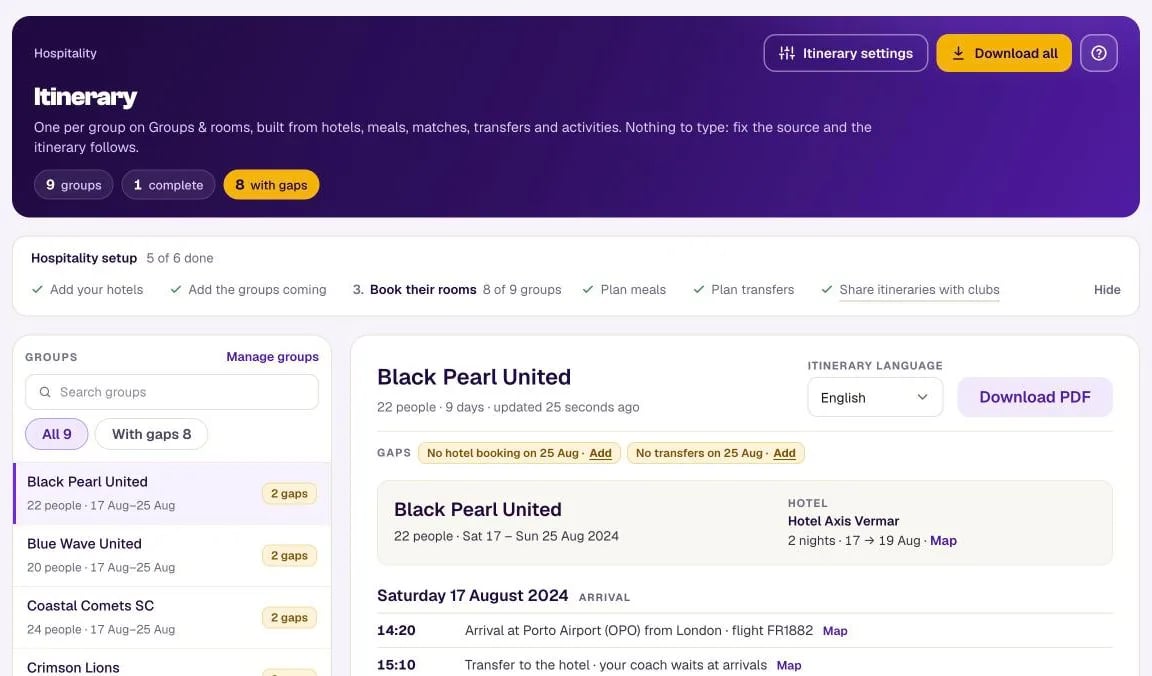
Pick a group on the left: the list holds your groups (from Groups & rooms), and Manage groups opens that page. Under each name: how many people, or Headcount not set if nobody has typed the group's size yet, and its dates. On a phone the list comes first; picking a group scrolls down to its itinerary. On the right is its itinerary exactly as the club will get it: the group, how many people, the hotel with a map link, then one section per day in time order — the arrival flight, the transfer to the hotel, breakfast, the drive to the venue, each kick-off, lunch, the drive back, dinner, and on the last day check-out and the departure.
A few lines are written for you:
- Times to follow — a knockout match whose opponent and time depend on the results, or a fixture that has a date but no kick-off time yet, is listed at the end of the day as TBA, so it never reads as happening after dinner.
- Dinner on your own — on a night the group sleeps at a booked hotel with no dinner booked. These lines have no time of their own. You can switch them off in Itinerary settings.
- (to be confirmed) — after a transfer planned for a match that has moved, was removed, or that the team no longer plays. It still prints, so the club knows a drive is coming; check it on Transport.
A meal sitting's notes are for you and your caterer: they never print on an itinerary.
Gaps#
Above the itinerary, MyCup lists what is missing — No transfers on 3 Apr, No hotel booking, No departure flight on 5 Apr, Transfer on 3 Apr uses a removed place, Transfer on 3 Apr is for a match the team no longer plays, Transfer on 3 Apr follows a match that has moved — each with a link to the page that fixes it (Add for something missing, Fix for something wrong). Gaps are shown to you only, never printed. The header counts how many itineraries are complete and how many still have gaps.
An itinerary covers at most 31 days: the busiest 31 days of the team's own dates, so one stray date far away (a test match, a mistyped year) cannot push the event off the page. Anything before or after that stretch is named as a gap — "Lines from 12 May on are not shown" — rather than silently left off.
A transfer that goes to a hotel the group is not booked at is listed as Transfer on 3 Apr goes to a hotel this group is not booked at, with a Fix link.
Sending them#
- Download PDF — one group's itinerary, in the language picked under Itinerary language beside it.
- Download all — every itinerary in one zip. It is prepared in the background: the page reads Queued… until a worker picks it up, then Preparing…. You can leave the page; the download appears there when it is ready, for 24 hours. If you switch Show hotel names to clubs in the meantime — or, while hotel names are hidden, show, hide, move or cancel a group's hotel or edit a booking or group — that zip is discarded, so you never send out hotel names you have since hidden; press Download all again. Starting it needs permission to edit Hospitality; anyone who can view the page can download the finished zip.
In Itinerary settings set the event city ("Times are local (Porto)") and the contact text printed at the foot of every itinerary.
In the Team panel#
Turn on Itinerary in Team panel settings and each club sees its own itinerary in its Team panel, in the manager's language: today opens first with the next item highlighted, earlier days fold away. Unlike a PDF sent last week, it is always current. Drivers' names and phones never appear on an itinerary.
The switch is off by default and is offered with the Hospitality plan, before your first group exists — no hotel needed, so a tournament that only runs transfers and activities can use it too. A club sees the page only when one of its groups on Groups & rooms is linked to its team.
If you switched off Show hotel names to clubs, the itinerary keeps the secret too: until you reveal a club's hotel on Rooming lists, its stay reads Hotel to be confirmed, transfers to the hotel give no address, and an activity held there says place to follow. Your own preview here shows the same, so you see exactly what the club gets.
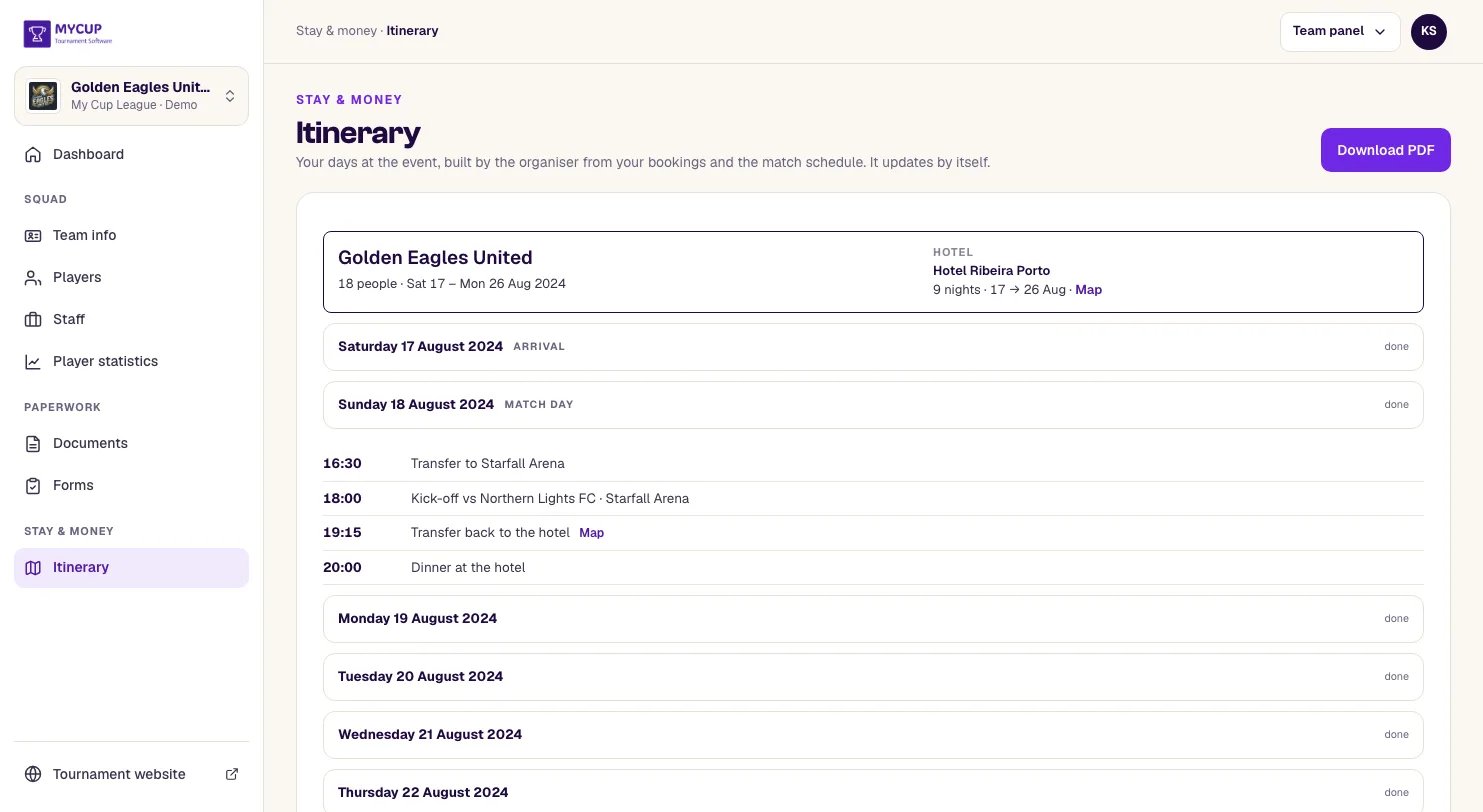
In your own preview the hidden hotel is named behind Hotel to be confirmed, so you can see which hotel the club is not shown yet.