
Meals
Open in StudioOn this page
A caterer asks one question: how many, and when? Meals answers it.
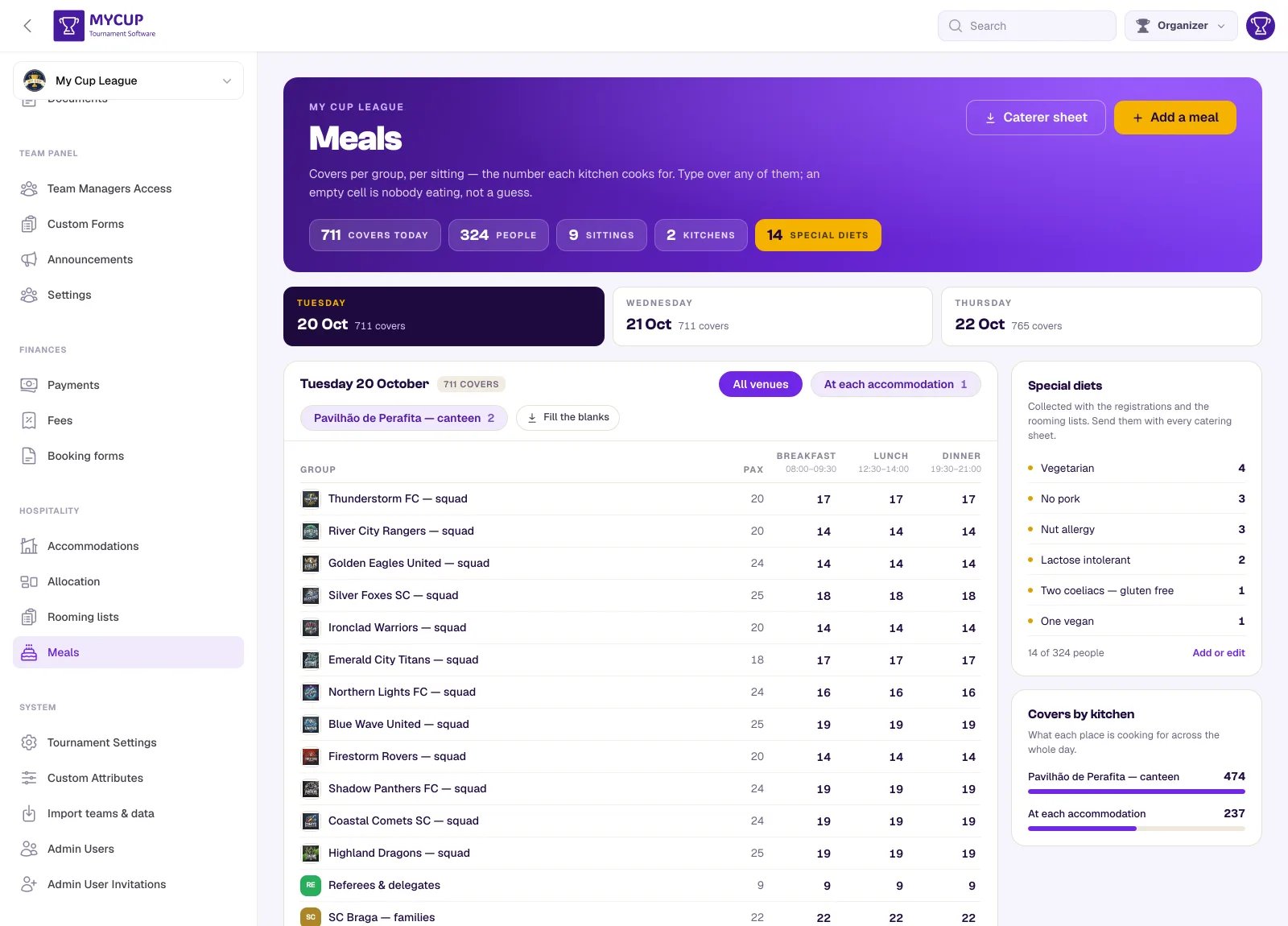
The header counts covers today (for the day you are on), people, sittings and, once a sitting names its place, kitchens — plus, in gold, the special diets declared, when there are any.
One day at a time#
The strip under the heading is one tab per day of your event, each carrying its own cover count. Pick a day and everything below it — the grid, the kitchen totals — is that day.
That is how a kitchen is briefed. A festival running three sittings across four days for forty clubs is over 400 numbers; all of them on one page is a list nobody can check by eye, and the question you actually arrive with is what does Saturday look like.
The day you are on is in the address bar, so a link you send a colleague opens on the same day you were reading.
Sittings#
A sitting is one meal, on one day, in one place: lunch on Saturday at the Perafita canteen. Press Add a meal.
| Field | Notes |
|---|---|
| Date | The day it is served. A new sitting starts on the day you are looking at. |
| Meal | Breakfast, lunch, dinner, snack or other. This decides where its column sits — a day always reads in the order it is eaten. |
| Name | Optional. Use it when the meal type is not enough: "Welcome dinner", "Second sitting". |
| Where | The kitchen. May be a hotel, or a canteen away from anyone's accommodation. |
| Served from / Until | The service window. A kitchen is told "07:30–09:00", not "07:30" — the window is what decides how many times the room turns over. The end is optional. |
| Price | Per person, if you are charging for it. A plain number — 25 or 25.50; a negative price, or one MyCup cannot read, is refused with a message rather than saved as no price. |
| Seats | How many the room holds. |
Create a sitting for every meal of every day, even the ones nobody pays for. The breakfast included in half board still has a number attached to it, and the hotel will ask.
Each sitting becomes a column in the grid, headed with its name and its service window. To change or delete one, click its name in the column header — the column is the sitting, so there is no second list of them to keep in step.
Covers#
Every group gets a row, every sitting a column, and the cell where they meet is how many of that group is eating at that sitting. Type into it; it saves as you leave the box, and the totals at the foot update with it. Clearing a cell (or typing 0) removes that group from the sitting; a number past 65,535 is refused with a message.
A grey number is a suggestion, not a booking. An empty cell shows the group's size in grey — what the cell would say if everyone ate. It is never totalled, never exported and never invoiced. An empty cell means nobody from that group is eating at that sitting, which is a real and common answer.
When a sitting is over capacity#
If you filled in Seats for a sitting and the covers booked into it go past that number, a banner appears at the top of the page naming the sitting, the day, how many people are booked and how many the room seats — "Saturday lunch is over capacity: 240 people booked for 11.04.2026, and the venue seats 200."
It is a warning, never a block. You are allowed to book past the room: a second sitting, extra tables or a bigger room are all normal answers, and software that refused would just mean you kept the real numbers somewhere else. The point is that you find out on this page in March, rather than from the restaurant manager on the night the coaches pull up.
The banner is per sitting, so several can be shown at once, and it clears itself as soon as the numbers fit again.
Fill the blanks#
Fill the blanks writes the group's size into every empty cell on that day, and stops there:
- It never overwrites a number you typed. Correct two clubs by hand, press it again for the rest, and your corrections survive.
- Press it twice and the second press does nothing.
- It only touches the day you are on.
Where does the size come from? The rooming list, once there is one — the number of people actually in the beds. Until a squad has been typed into rooms, it falls back to the headcount declared for the group.
Why it is not simply derived#
MyCup could assume everyone in a group eats every meal and never ask you. It deliberately does not:
- Clubs arrive late and miss the first dinner.
- Families booked half board and are eating in town on Saturday.
- The Sunday squad is nine players, not eighteen, because the rest went home after the semi-final.
A caterer who cooks 400 lunches for 280 people remembers it, and so does your budget. The number in the cell is the number you are committing to — which is also why the invoice and the caterer sheet can only ever read numbers that are actually there.
More than one kitchen#
A kitchen is not something you create. It is the place you type into a sitting's Where field, and it appears on Covers by kitchen because a sitting is served there. Type a new place on a sitting and the kitchen appears; move those sittings elsewhere and it goes.
That leaves one thing you genuinely could not do: Rename, on each kitchen row, changes the name on every sitting served there in one press. Renaming into a name that already exists merges the two — which is how "Pavilhao" and "Pavilhão" get joined back into one room.
The Where field suggests the places you have already used, so you pick rather than retype. That is what stops one room becoming three rows in the first place.
When a day is served in more than one place, chips appear beside the day's heading. Pick one and the grid narrows to that kitchen's sittings; All venues brings the rest back.
Covers by kitchen in the right-hand column totals the whole day per place. A kitchen is quoted per sitting but staffed per day, so that is the figure the person cooking cares about.
The catering list#
A headcount tells a kitchen how many to cook for. It does not tell them what — and for a breakfast that is the whole job: rolls, juice, chocolate milk, coffee for the staff, a quantity per item per club. That is a requisition, and most tournaments collect it today with a custom form and total it by hand.
Open the sitting from its column header and press Catering list. Most sittings never need one — a dinner is a headcount and nothing more — which is why it lives there rather than on the grid.
Inside is the same shape as the main page: groups down, items across, a To make row at the foot. That last row is what the kitchen is given.
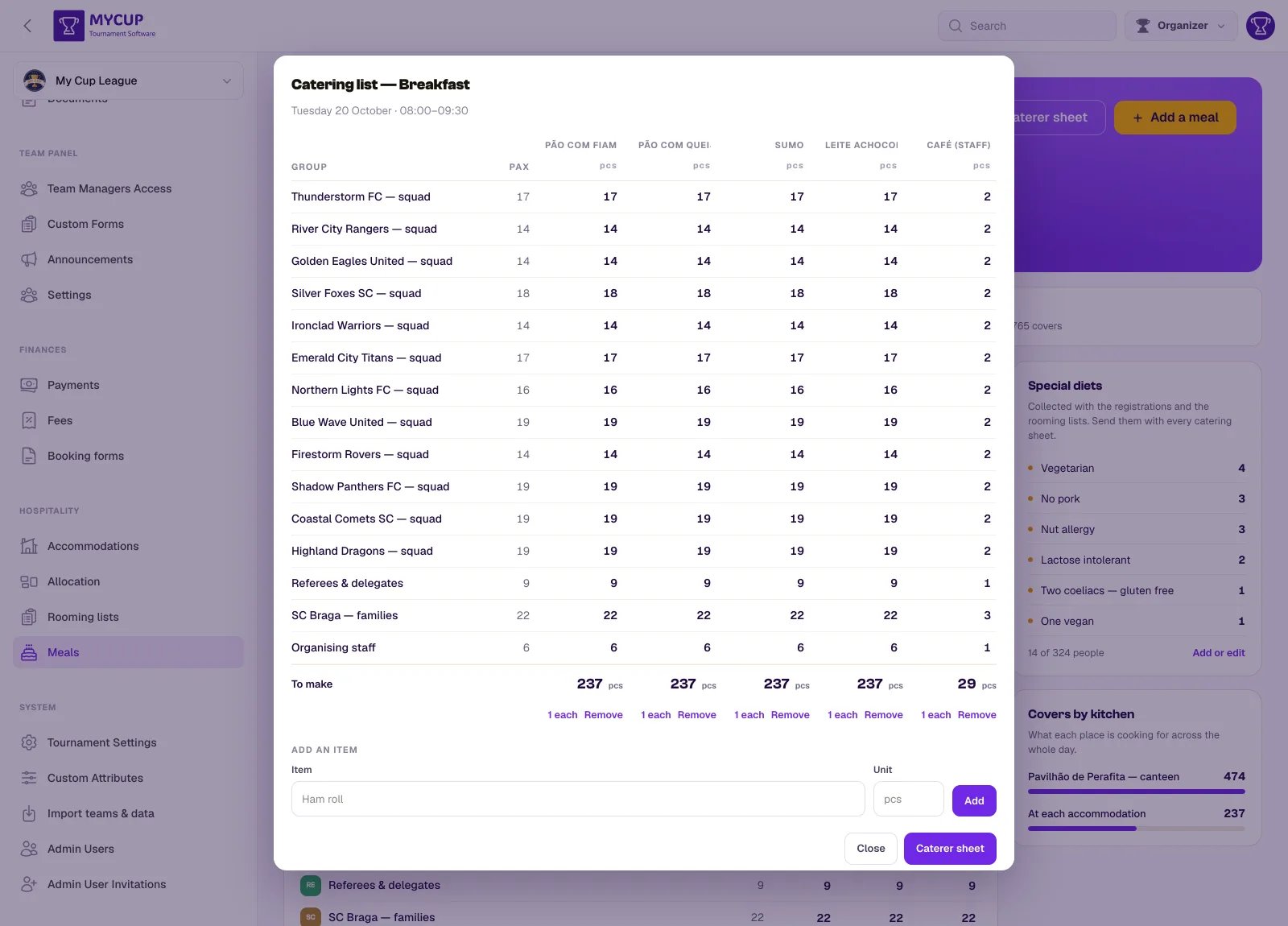
- Add an item — what has to be produced, and optionally a unit (
pcs). - Item names are edited in place — click a name to change it, Enter to save, Esc to leave it as it was. A requisition is typed once and corrected often. Long names wrap in their column rather than being cut off.
- 1 each fills every blank from that sitting's covers — one roll, one juice, one coffee per person — and never overwrites a number you typed.
- Remove takes the item and every quantity asked against it.
Only the groups actually eating at that sitting appear. A quantity belongs to a cover, so a club with nobody at breakfast cannot ask for twelve juices. If nothing is booked yet, the page says so rather than showing you an empty grid.
Clear a group's cell on the main grid and type it again later, and its quantities on this list start afresh: they were sized for the headcount it had before, and 1 each skips a group that already has a number, so the old figures would otherwise reach the kitchen against the new headcount.
The caterer sheet gains one tab per sitting that has a list — Saturday's breakfast is a different piece of paper from Sunday's, and a caterer reading a merged list has to filter it by hand at 6am.
Special diets#
Special diets shows every dietary requirement in the tournament: first the ones from your list that team managers picked for their players, then the typed notes, largest first — the note a club writes on its booking and the per-person note on a rooming list. A kitchen needs all of them, and you should not have to check two screens and hope you remembered the second.
The figure under the panel (31 of 387 people), and the gold special diets in the header, count both: every player with a requirement from your list, plus every typed note. A player with two requirements, or with one from the list and a note on their own rooming row, counts once.
A club's note is counted once, however many times that club eats — it is one fact about the club, not one per sitting.
The list your tournament caters for#
Manage list is where you declare the requirements this tournament caters for — Gluten free, No pork, Nut allergy. Add the usual ones fills it with the common eight in one press if you have no list yet.
Each one can carry a note for the kitchen — "no gluten in any form, including sauces" — which is the part a caterer actually needs and the part a one-word label cannot hold.
Team managers then pick from your list for each of their players, on their own Players page. That is the whole point of it being a list: before this, requirements were free text, and one tournament held No pork, no pork and No Pork as three separate requirements — so the kitchen was briefed to cater for three things that are one thing.
The panel counts people, not entries. Nine coeliacs is nine of one thing, and Add or edit (below) shows the names, which answers the question a kitchen always asks next: which table.
A requirement nobody carries is not shown to the kitchen, and removing one takes its assignments with it.
Typed notes#
Underneath the list are the free-text notes — the "anything else" a list cannot hold ("no shellfish, and she cannot sit near nuts"), plus every note that arrived before you had a list.
They come from two places: the note a club writes on its booking, and the per-person note on a rooming list, which the import reads from a Food Restrictions column.
Adding and editing them#
Add or edit opens those notes. Every one is editable in place, removable, and there is an Add row at the foot.
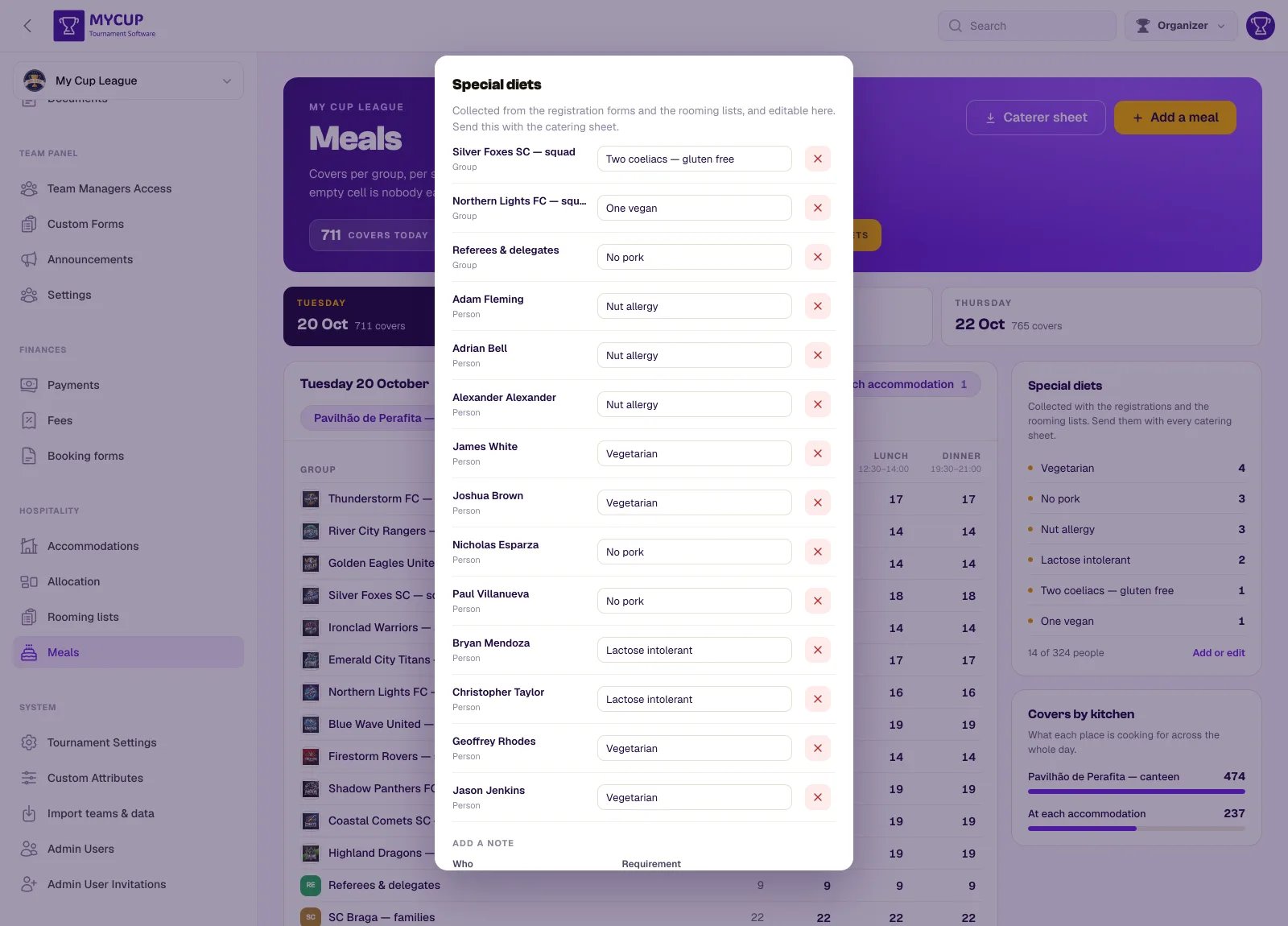
A note is about a group or about a person, and the two are stored differently:
- A group note — "two coeliacs" — is written onto every cover that club holds, so it stays one fact however many times they eat. A cover added later carries it too, whether you type it into an empty cell, press Fill the blanks, or clear a cell and type it again. The group has to be eating somewhere first; if they have no covers, the page tells you so by name rather than saving nothing and reporting success.
- A person note — "nut allergy" — lives on that person's rooming row, so it follows them to whichever hotel they end up in.
Notes also arrive by themselves: the rooming-list import reads a Food Restrictions column, and clubs fill them in on registration forms. This screen is where you correct them and add the ones that came in a phone call.
Send the list with the catering sheet — a count on its own cannot be acted on, because the kitchen's next question is which table.
They do not stay forever#
Dietary and medical requirements are health information, so they expire on the same schedule as the passport numbers on a rooming list: a weekly job clears the typed notes and the requirements assigned to players from your list once the tournament is well over — the last check-out, or the date you marked it finished, whichever is known.
Your catalogue of requirements stays. It is what this tournament caters for, not information about a person.
Sending it to the caterer#
Caterer sheet in the header downloads the whole tournament as one spreadsheet: sittings down the page, groups across it, totals on both edges — the shape a kitchen reads, and the shape that makes a mistake visible, because a column that should be flat across three days and is not stands out.
Dietary requirements get their own tab, and each sitting's catering list gets one of its own, rather than sitting in the cells where they would be invisible until clicked. A group eating nothing at all is left out entirely: a festival carries groups that are housed but not fed, and a column of blanks for each of them is noise in the only artefact the kitchen reads.
It is the whole event in one file on purpose. A kitchen is quoted for the tournament, not for Saturday lunch, and nine downloads to attach to one email is exactly the manual step this page exists to remove.
Deleting a sitting#
Open the sitting from its column header and press Delete. The covers booked against it go with it, and the page says so before it does.
Next steps#
- Booking forms — bill a club for their accommodation and meals in one document