
Tasks
On this page
Running a tournament is a long list of jobs: book the venues, confirm the referee pool, send the rooming lists, order the medals. Tasks keeps that list in MyCup, next to the tournament it belongs to, so your whole organiser team sees the same list and nobody keeps a private spreadsheet.
Tasks is on every plan. Open it from Tasks at the top of the sidebar, under Dashboard.
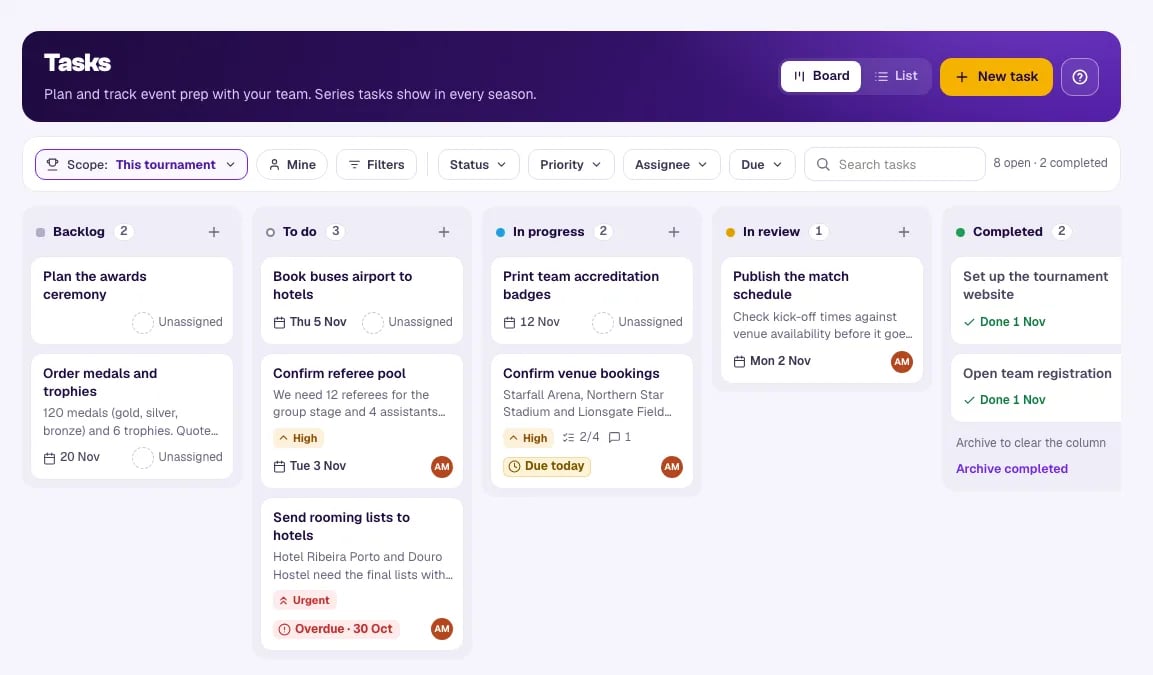
The ? button beside New task explains the board in three steps and links back to this guide.
The board#
Every task sits in one of five columns:
| Column | Use it for |
|---|---|
| Backlog | Ideas and jobs for later |
| To do | Jobs that are ready to start |
| In progress | Someone is working on it |
| In review | Done, waiting for someone to check |
| Completed | Finished. The newest 20 show here; See all in list shows the rest |
Move a card by dragging it, or with its ⋯ menu (Move to). A card shows its title, the first lines of its description, its priority when it is High or Urgent, checklist progress, comments, the due date and who it is assigned to.
Prefer rows? Switch from Board to List at the top right. The list sorts by any column and shows 50 tasks per page.
One board across all your tournaments#
If you run several tournaments, you don't have to open each one to see what is left. The Scope button at the top of the board offers:
- This tournament — only this tournament's tasks (the default).
- All tournaments — every task in every tournament you can see, on one board.
- Choose tournaments — tick the ones you want, with a search box when you have many.
Your choice applies at once and is remembered for next time. Off This tournament, each card carries a chip with its tournament's initials and name, so you always know where a task belongs.
You can change any task you have permission to change from any board. On a board that mixes tournaments, moving a card only changes its column: it goes to the top of its own tournament's column, because the order of cards is kept per tournament.
Series tasks#
If your tournament has seasons, a task can belong to This season only or to the Whole series. A series task carries a Series marker and shows on the board of every season. Use it for jobs that outlive one edition, like renewing a venue contract or updating the sponsorship deck.
Deleting a series task removes it from every season, and MyCup asks you to confirm.
My tasks on the dashboard#
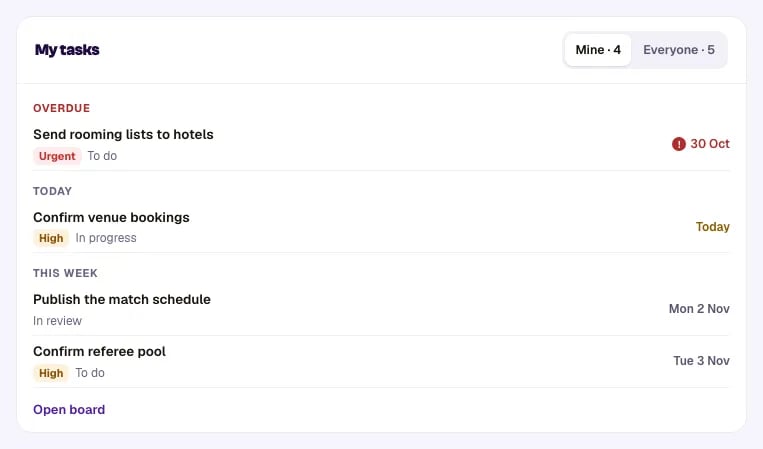
The Dashboard has a My tasks card. It lists tasks that are overdue, due today or due this week, across every tournament you run, overdue first. Switch between Mine and Everyone, or click Open board to go to Tasks.
The Tasks link in the sidebar shows a count of your tasks in this tournament that are overdue or due today.
Who can see and change tasks#
Tasks are for your organiser team:
- Administrators see and change the tournament's tasks.
- Results editors don't see Tasks.
- Team managers, clubs and website visitors never see tasks.
You can assign a task only to an administrator of that tournament. If someone leaves the organiser team or loses access, their tasks there are unassigned automatically, and the task's history says so. A series task stays with them while they still help run another season of that series.
A task from a tournament where you can only view shows View only: you can open it, but not move or change it.
Good to know#
- Finished tournaments keep their tasks and stay editable, as a record of what was done.
- Nothing is copied to the next season. Series tasks already show there; season tasks stay with their season.
- No email. Tasks live in MyCup only; nobody is notified by email.
- No attachments yet. Put a link to the file (Google Drive, Dropbox, …) in the description or a comment.
- Limits: a season or a series holds up to 500 open tasks. Completed and archived tasks don't count. A checklist holds up to 200 items.
Connecting other systems#
If you sync tasks with another system, the MyCup API can read and write a tournament's tasks and its series' tasks, with the tasks:read and tasks:write scopes. A task created through the API names the connection instead of a person. A connection can delete only the tasks it created itself.
Next steps#
- Working with tasks — create, assign, comment, move and archive
- Organiser team and roles — who can see Tasks