Team Dashboard
Last updated: October 3, 2026
When team managers log into the Team Panel, they land on a dashboard built around one question: when do we play next, and what does the organiser need from us? What it shows depends on where the team is in the tournament, so the page has three layouts — before kick-off, during the season and after the season — and switches between them on its own.
- Before kick-off — the team has not played yet and has no match in progress
- During the season — from the team's first match onwards
- After the season — once the tournament has finished, the same moment the squad becomes read-only
Every button and link on the dashboard leads to a page the manager can actually open. If you have switched a page off in the Team Panel settings, or the plan does not include it, the dashboard does not point to it.
Before Kick-Off#
The header shows the team crest and name, the division and group, and a Starts … badge with the tournament dates when you have set them.
Countdown#
A dark card counts down to kick-off — Kick-off in so many days and hours. It counts to the team's first match when one is scheduled, and to the tournament's start date otherwise.
Once the schedule is published, the card also shows Your first match: the opponent, date, time, home or away, the venue, and a Get directions button when the venue has a map link. Until then it says the organiser has not published the schedule yet.
Next to it, Your group lists the teams the club has been drawn with, with the club marked You.
Squad deadline#
If the roster mode closes the squad on a date, a warning names it — "Squad list closes on Sat 20 Sep" — and explains that after that only the organiser can change the squad. It shows only in the deadline modes, and only while the date is still ahead and the roster is not already locked.
Get your team ready#
A checklist of what the club owes the tournament, with a progress bar ("3 of 5 done"). Each row links to the page that settles it:
| Row | Done when |
|---|---|
| Squad | At least one player is on the roster |
| Staff | At least one coach or staff member is added |
| Team info | The team has a logo and a contact email or phone |
| Forms | Every active form is filled (the row links straight to the first unfilled one) |
| Documents | At least one document is shared with the organiser |
| Payments | Nothing is outstanding — a row with money owed is marked as a warning |
Rows appear only when they apply: Forms only if you have active forms, Payments only when the Payments page is on and the club has been charged something, and each row only if the manager can open its page.
When the squad is under player verification, the Squad row also says how many players are waiting for the organiser's check. In other modes that line does not appear.
A list the manager cannot edit — a locked roster, staff or team details you manage yourself — is shown as Kept by the organiser, with a View link instead of a task. Those rows do not count towards the progress bar: they are information, not homework.
Alongside the checklist, Your schedule lists the club's first fixtures, and Messages shows your welcome message and any announcements that do not ask for acknowledgment.
During the Season#
Things that need you#
When announcements are waiting for acknowledgment or forms are still unfilled, a card at the top counts them — "2 things need you" — and lists each one. Announcements show their acknowledgment date, and an Overdue badge once it has passed. The card can be collapsed.
Next match#
The dark hero card shows the club's next fixture: Next match, the opponent's crest and name, HOME or AWAY, the date and kick-off time (or Kick-off to be confirmed), the venue and the round. Buttons offer Get directions and Review squad.
While the match is being played the card reads Playing now, with a live marker.
When there is no fixture to show, the same card explains why instead:
- No fixtures yet — the organiser has not published the schedule
- Knocked out — "Your run ends here", with the team's record, while the tournament carries on without them
- Final whistle — the team has played all its matches
On a brand-new team with no players and no fixtures, the card welcomes the manager and offers Add your squad.
Season so far#
Beside the next match: the team's position in its group, how many points it trails the leader by, the form guide (the last five results as W/D/L) and the record — matches played, wins, draws, losses and goal difference.
Results and standings#
- Upcoming — the fixtures after the next match
- Recent results — finished matches with their scores, with an All results link to the team's page on the tournament website when that page is on
- Standings — every table the team appears in, opening on the most recent, with arrows to page between them. A knockout round shows its matches instead of a table.
Squad and leaders#
- Squad — player photos, and the number of players, staff and the average age, with a Manage link to the Players page. Only in team sports.
- Team leaders — the club's top three scorers and top three assistants. Only when the sport records goals.
The Messages card sits here too.
After the Season#
A banner at the top says This tournament has finished and that the squad, documents, forms and team details are now read-only.
Season summary#
The hero card reads Champions — "You won the …" — when you crowned the club champion, and Season complete otherwise. It shows where the team finished in its group, the form across every match of the season (oldest first) and the record: Played, Won, Drawn, Lost, and Goals for and Goal difference when the sport records goals.
Below it:
- Season leaders — the club's top scorer and most assists, with a link to All statistics
- All results — every match the team played
- Final table — the last group table the team played in
Next season#
For a tournament that runs seasons, a Next season card looks ahead. It names the next season only when you have published it or have already added this manager to it; otherwise it simply says the manager will get an email when the next season starts and they are given access.
When you have added the manager to the next season, the card says their club, players and staff were carried over, and offers Open season … to go straight there.
Club history#
Your club in this cup lists the club's last three seasons here — the record and the result (Champions, Won by …, This season or Completed) — with a link to the full Club history page. It appears only when the club is linked in your library and the manager can open Club history.
KickPilot#
At the bottom of the dashboard, a band introduces KickPilot, MyCup's sister product for running a club the rest of the year. It is not shown on a brand-new team.
Navigation#
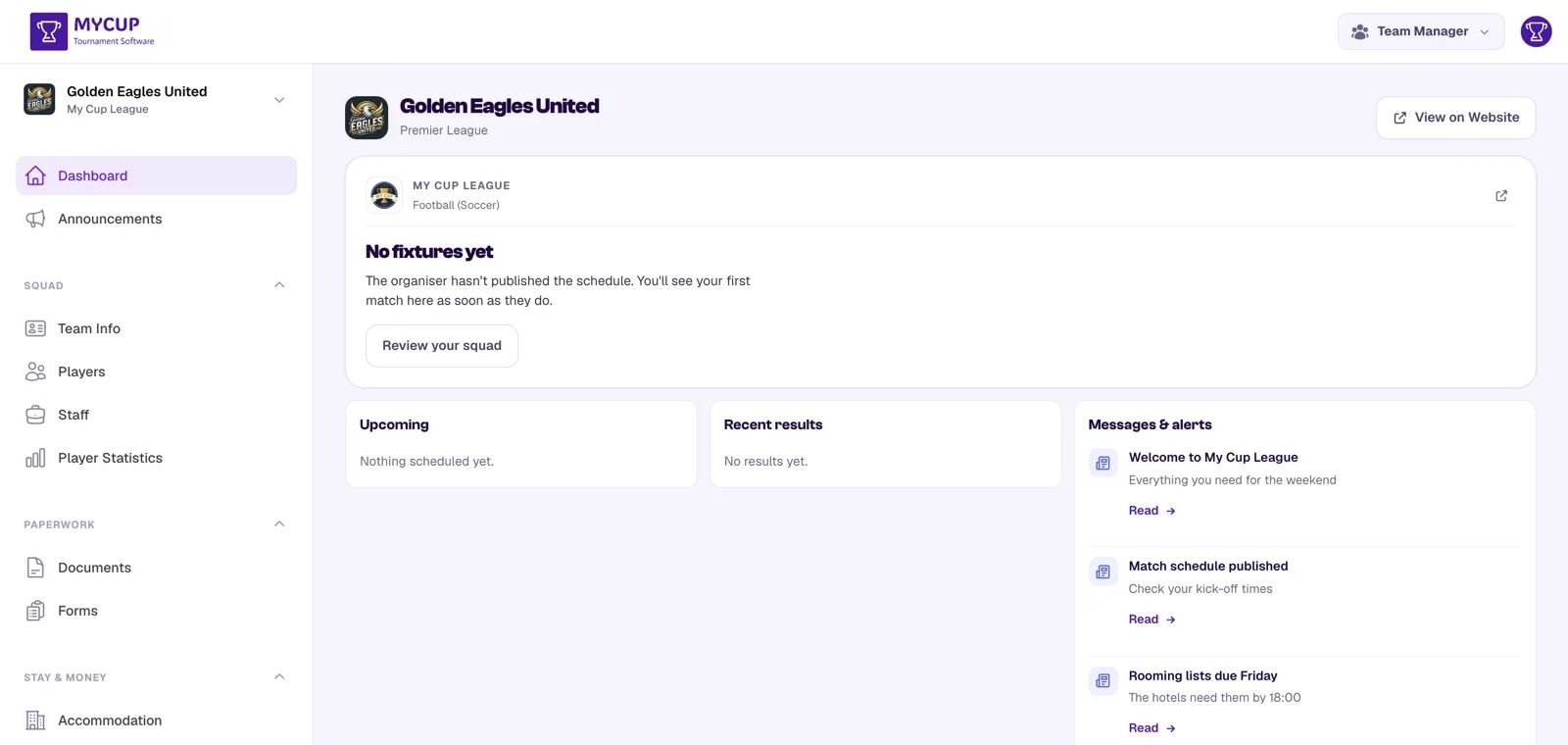
From the dashboard, team managers reach everything else through the sidebar. It is grouped by the kind of task rather than alphabetically, so a manager looking for one thing is not reading ten items:
Dashboard and Announcements sit at the top, ungrouped — the panel's front door.
| Group | Pages | What it answers |
|---|---|---|
| Squad | Team info, Players, Staff, Player statistics, Club history | Who is coming, and how they played |
| Paperwork | Documents, Forms | What we have to send in |
| Stay & money | Accommodation, Payments | What attending costs us |
Pages appear only when they apply. Payments needs the balance setting on; Accommodation needs Hospitality on and this club to have a booking; Club history appears only when the tournament runs seasons and the club is linked in your library. A group with nothing in it does not render at all — so a tournament running neither Payments nor Accommodation shows just Squad and Paperwork.
On a phone the same groups become tabs along the bottom of the screen: Home, Squad, Paperwork, Stay & money and Updates (announcements).
The team card at the top of the sidebar opens Switch team or season: the other seasons of this tournament the manager ran this club in, and any other teams they manage. Only tournaments whose team panel is open are listed.
Was this page helpful?
Let us know if you found this documentation helpful or if you have suggestions for improvement.