Public Website
Last updated: October 6, 2026
Every MyCup tournament comes with an automatically generated public website. Your tournament website provides a professional online presence where fans, participants, and media can access information about your tournament. See example tournament website
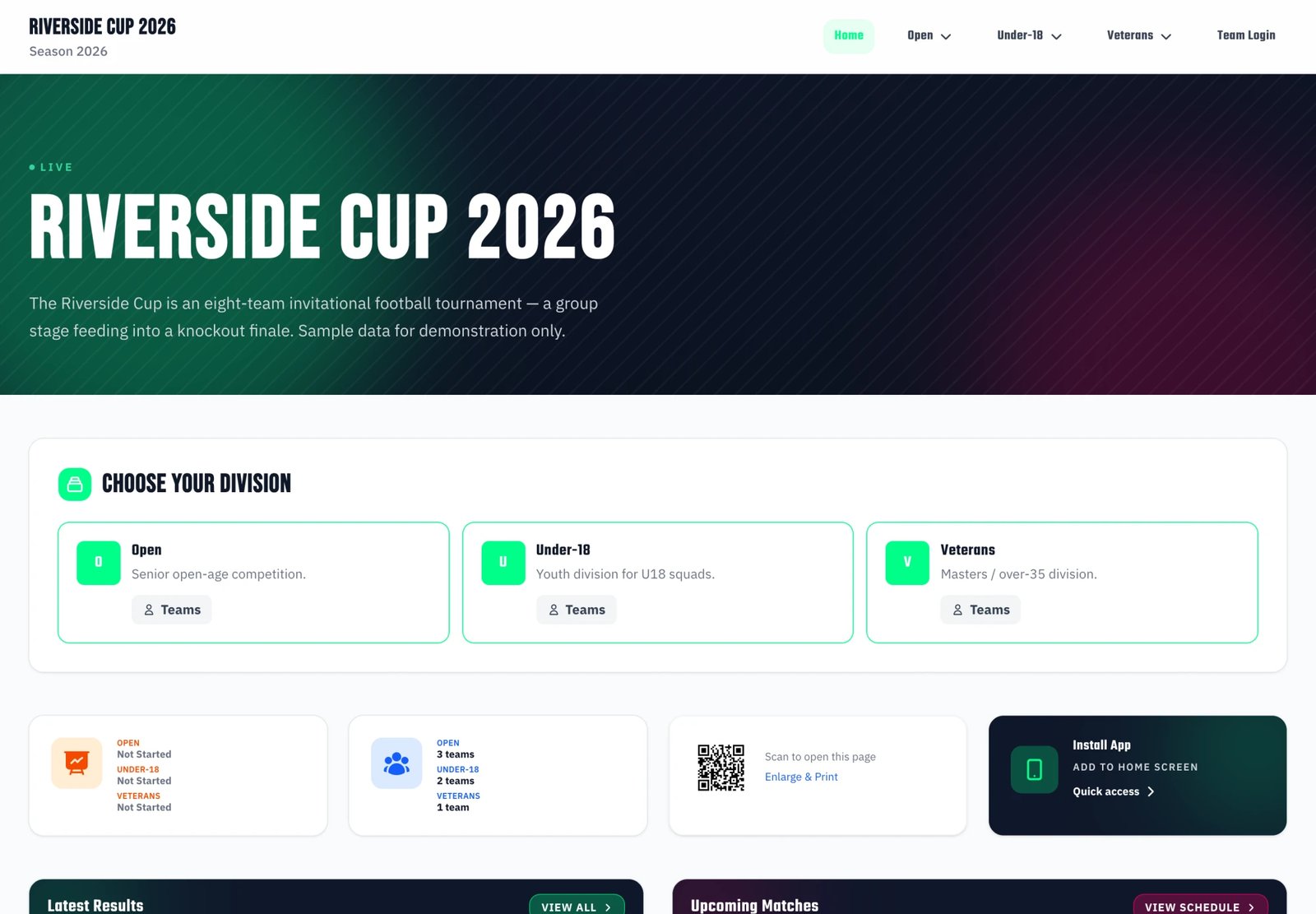
New: the Website Editor. You now build and customize your website with a visual, drag-and-drop Website Editor (in the dashboard under Website > Website Editor). It replaces the old Website Settings page. Changes are saved as a draft and go live when you press Publish. See the full guide: Website Editor. This page remains the reference for what each public page shows.
Overview#
Your tournament website features:
- Automatic Generation: Website created automatically when you create your tournament
- Draft & Publish: Customize in the Website Editor, preview your changes, then publish them live. (Tournament data — results, standings, fixtures — still updates in real time.)
- Responsive Design: Works perfectly on all devices (mobile, tablet, desktop)
- Mobile App Installation: Install as PWA app on iOS and Android devices
- Real-Time Updates: Data synchronizes automatically from your dashboard
- SEO Optimized: Good search engine visibility
- Public Access: Website is publicly accessible to everyone
Website Features#
Available Pages#
Your tournament website includes the following pages:
Homepage
- Tournament overview
- Recent results
- Upcoming matches
- Important announcements
Matches Page
- Tournament-wide list at
/matches, paginated 50 per page - Filter by status (Upcoming / Finished / In progress / All), division (multi-division tournaments), and team name search — filters compose and are preserved across pagination
- Drill into a single phase (
/matches/phase/{phase_id}) or matchday (/matches/{matchday_id}) from the phase/matchday selector - The "Próximas partidas" and "Últimos Resultados" blocks on the homepage link straight into this view with the right status filter pre-applied
- Match details page for each fixture
Results Page
- One page per stage, picked from the Stages list on the left
- Group stages: every group of the stage on one screen — two tables side by side on wider screens, one under the other on phones. A link ending in
?group=Group Ajumps straight to that group and outlines it - Knockout stages: a grid of compact matchup cards — both teams, each leg's final score (penalties in brackets), the winner marked, and the kickoff and venue underneath. Click a score to open that match
- When a stage carries results over from an earlier one, a note under the table says what was carried
- Top scorers (separate page, optional — see settings below)
- Top assistants (separate page, optional — see settings below)
Structure Page
- The whole tournament at a glance: groups with their current standings, and the playoff bracket with every round stacked from the top
- Click a team to open its page, and a playoff score to open that match (score links appear only while the Matches page is switched on)
Teams/Participants Page
- All participating teams or individual participants
- Team/participant profiles
- Logos and photos
- Squad lists (for team sports)
- Optional Staff tab on each team page (see below)
Venues Page (optional)
- All tournament venues with photos and descriptions
- Each venue links to a dedicated page with its full match schedule
- Venue mentions in matches become clickable links to that venue
- With hall screens on (Premium), each venue also gets a self-refreshing projector page
Registration Page (if enabled)
- Team/participant registration form
- Registration requirements
- Deadline information
Sponsors Page (premium feature)
- Showcase tournament sponsors
- Sponsor logos and descriptions
- Links to sponsor websites
- Professional sponsor display
Documents Page (premium feature)
- Publish your rulebook, schedule, entry forms and venue information
- Upload files, or link to files you already host on Drive or Dropbox
- Visitors download straight from your website — no more emailing the same PDF to every team
- See the Documents guide
Managing Your Website#
Everything below is configured in the Website Editor — open it from the dashboard under Website > Website Editor. The editor is a visual, drag-and-drop builder: arrange the home page, toggle pages on or off, set the theme, manage sponsors, and more. Changes are saved to a draft and go live when you press Publish.
For a full walkthrough of the editor itself, see Website Editor.
Website Configuration#
Website URL#
Your tournament website URL format:
https://mycup.me/tournament/{tournament-id}
Example: https://mycup.me/tournament/axbp71lzht
Custom Domains:
- Custom domains are not available out of the box
- Contact us if you need a custom domain for your tournament
- Available for premium tournaments by request
Website Visibility#
Your tournament website is publicly accessible. When you make changes in the Website Editor, they stay in a draft until you press Publish, at which point they go live for everyone.
Website Language#
Your tournament website displays in a single language:
- Language is set from the language selector in the Website Editor toolbar
- Available languages: 15+ languages including English, Spanish, Portuguese, German, French, Italian, Polish, Russian, Ukrainian, Turkish, Czech, Dutch, Swedish, Norwegian, Belarusian
- Language switcher is not available - website shows only the selected language
- Change language anytime from the editor toolbar
The same tournament can be presented in any supported language — here's the public site rendered in Spanish:
Website Theme & Colors#
Customize the look and feel of your tournament website from the Theme button in the Website Editor toolbar — it opens the Theme & colors panel. You pick one theme — a complete look that sets colors and typography together. Everything here is free on every plan.
Themes — each a ready-made look, shown in two groups:
- Standard: Default/Dark Stadium (default), Light Mode, Blue Sports, Red Energy, Green Field, Purple Esports, Orange Fire, Gold Championship, Teal Modern, Midnight Black
- Editorial: Editorial Night, Editorial Day, Classic Championship, Broadcast, Pitch, Court, Sand
Every theme is selectable on any plan — there are no locked or "Pro" themes.
For the full breakdown, see Themes & Backgrounds.
Changing your theme:
- In the Website Editor, click Theme in the toolbar
- Pick a theme (or Custom colors — see below)
- Publish to make it live
Custom Colors (free on every plan):
Prefer your own colors? Define a fully custom scheme:
- In the Website Editor, open Theme and choose Custom colors (the last tile in the picker)
- Configure:
- Background color: Main background for hero sections and headers
- Primary accent color: Buttons, links, highlights, and interactive elements
- Secondary accent color: Gradients and energy effects
- A live contrast check warns you about hard-to-read combinations (a red warning blocks publishing)
- Click Apply colors to apply your custom colors
Hero Background Image (Images Feature):
Add a custom background image to your hero sections — this is set from the Hero block, not the Theme panel:
- In the Website Editor, edit the Hero block on the Home tab
- Pick a ready-made Sample background, or upload your own image
- Recommended size: 1920×600 pixels or larger
- The image will be overlaid with a dark gradient for text readability
- Publish to apply
See Themes & Backgrounds for the sample background gallery and details.
Page Visibility Settings#
Control which pages are shown on your public website:
Enable/Disable Pages:
- ✓ Matches - Show fixture list and results
- ✓ Results - Show standings, tables, and brackets
- ✓ Top Scorers - Dedicated page listing the tournament's top goalscorers
- ✓ Top Assistants - Dedicated page listing the tournament's top assistants
- ✓ Teams/Participants - Show team or participant directory
- ✓ Team Staff - Add a Staff tab to team pages (off by default)
- ✓ Venues - Show venues page with each venue's match schedule (off by default)
- ✓ Registration - Show sign-up form (if enabled)
- ✓ Sponsors - Show sponsors page (premium feature)
- ✓ Documents - Show documents page with your rulebook, schedule and forms (premium feature)
Each page has its own tab in the Website Editor (Results, Matches, Teams, Venues, Registration, Sponsors, Documents) where you toggle it on or off and set its options.
Sponsors and Documents can also be switched on or off from their own dashboard pages — Website > Sponsors and Website > Documents — where an On your website strip shows whether the page is live, whether it's in the menu, and gives you a direct link to view it.
Top Scorers and Top Assistants Pages#
If your tournament tracks player events (goals, assists), you can publish dedicated statistics pages on the public website:
- In the Website Editor, open the Results tab
- Enable Top Scorers Page Enabled to publish the goalscorer ranking
- Enable Top Assistants Page Enabled to publish the assistant ranking
- Save
Once enabled, the pages appear as links in the results sidebar on the public website at /results/scorers and /results/assistants.
Requirements:
- The Results page must be enabled
- The sport must support teams and players (these toggles are hidden for sports without player rosters)
- Match events must be recorded for the rankings to populate
When the Top Scorer info card on the homepage is enabled, it reads from the same data and highlights the tournament's leading goalscorer.
Registration#
Your public registration page shows the sign-up form whenever registration is open. What the form asks, when it is open and who is notified are set on Sales → Registration form — each field can be Off, Internal, Optional or Required, and the form opens and closes on your dates in the tournament's time zone.
The Website Editor's Registration tab keeps how the page looks on your site — the menu item, the QR code and the description above the form — plus a card showing whether registration is open right now, with a link to the Registration form page.
Sign-ups arrive on the Candidates page as Pending leads.
Venues Page#
The Venues page is a public page that lists every venue you've added in the dashboard, with photos and descriptions. Each venue card links to its own detail page showing the full match schedule held at that venue. When the page is enabled, venue mentions inside match cards across the public site become clickable links to the venue's page.
Enabling the Venues Page#
- In the Website Editor, open the Venues tab
- Toggle Venues Page Enabled on — venue detail pages become reachable and venue mentions inside matches turn into clickable links
- Optionally toggle Show Venues in Top Menu on — adds a "Venues" link to the public website navigation. This is a separate switch so you can keep the pages live (linked from matches) without cluttering the top nav
- Click Save
Each venue is reachable at /venues/{venue-id}. The full list is at /venues.
When Venues Page Enabled is off, all venue URLs return 404 and venue names render as plain text everywhere on the public site.
What Appears on a Venue Page#
- Venue name, photo (tap to enlarge) and description (managed under Tournament Management > Venues)
- Total match count, and the venue's address with a link to directions when you've filled it in
- Arrows to the previous and next venue
- Upcoming Matches, grouped by day. A match being played right now sits on top under Now, with its live score.
- Finished Matches, grouped by day, most recent first, with scores
- A Copy link button, and share buttons at the bottom of the page
Each match row shows the group and division it belongs to, and opens the match page.
Matches are sourced from the schedule you've built, so the venue page reflects the current state of your tournament automatically.
Hall screens#
When hall screens are switched on (Premium plan), each venue page also has a Hall screen button. It shows the link to that venue's projector page, a QR code to open it on the screen's computer, and what the screen shows. See Hall Screens for setup.
Team Staff on Website#
Adds a Staff tab to each team page on the public website (next to the existing Players tab). Each staff member becomes clickable and opens their own profile page with photo, role, age, and any custom attributes you've marked as visible on the website.
Enabling Team Staff Display#
- In the Website Editor, open the Teams tab
- Toggle Show Team Staff on Website on (the toggle is only available when the Participants page itself is enabled)
- Click Save
The Staff tab appears on every team page that has staff members assigned. Staff profile pages are reachable at /staff/{staff-id}.
What Appears on a Staff Profile#
- Name, photo, and role
- Age (if date of birth is set)
- Additional info (if filled)
- Any custom attributes for the Staff entity type with Visible on public website enabled
Custom attributes are configured per-tournament under System > Custom Attributes. Pick the Staff entity, mark the attributes you want public, and they'll render on the staff profile.
Sponsors (Premium Feature)#
Overview#
The Sponsors feature allows you to showcase your tournament sponsors on your public website. This premium feature is available with premium plans and helps you:
- Give recognition to tournament sponsors
- Provide professional sponsor visibility
- Drive traffic to sponsor websites
- Enhance tournament credibility
Accessing Sponsors Feature#
Requirements:
- Premium plan with sponsors feature enabled
- Manage sponsors and configure the sponsors page from the Sponsors tab in the Website Editor
Managing Sponsors#
Adding a Sponsor:
- In the Website Editor, open the Sponsors tab
- Click "New Sponsor"
- Fill in sponsor information:
- Name: Sponsor company or organization name (required)
- Logo: Upload sponsor logo (16:9 aspect ratio recommended, max 2MB)
- Website URL: Sponsor website link (optional)
- Description: Brief sponsor description or bio (optional)
- Enable clickable link: Allow visitors to click logo to visit sponsor website
- Active: Show or hide sponsor on website
- Sort Order: Control display order (lower numbers appear first)
Sponsor Logo Guidelines:
- Recommended size: 800×450 pixels (16:9 aspect ratio)
- Format: PNG, JPG, or WebP
- Maximum file size: 2MB
- Logos are automatically optimized for web display
Managing Multiple Sponsors:
- Drag and drop to reorder sponsors
- Use sort order field for precise control
- Deactivate sponsors without deleting them
- Edit sponsor details anytime
Sponsor Display#
Sponsor Section (All Pages):
Sponsors appear in a dedicated section before the footer on all website pages:
- Shows up to 8 sponsors in a horizontal layout
- Logos displayed in grayscale with color on hover
- Click logo to visit sponsor website (if enabled)
- Link to full sponsors page (if enabled)
- Responsive design for all devices
Dedicated Sponsors Page:
When enabled, a dedicated sponsors page shows all active sponsors:
- Professional grid layout (3 columns on desktop)
- Full sponsor information and descriptions
- Sponsor logos with click-through to websites
- "Visit website" call-to-action buttons
- Accessible via
/sponsorsURL path
Sponsors Page Settings#
Configure sponsors display from the Sponsors tab in the Website Editor:
Sponsors Page Enabled:
- Enable or disable the dedicated sponsors page
- When disabled, sponsors still appear in footer section
- When enabled, "View all sponsors" link appears in footer section
Sponsors Section Title:
- Customize the title shown above sponsors
- Default: "Our Sponsors" (translated to website language)
- Leave empty to use default translation
- Custom title overrides translation
Sponsors Section Description:
- Customize the description text
- Default: "Thank you to our sponsors for supporting this tournament"
- Leave empty to use default translation
- Custom description overrides translation
Sponsor Features#
Clickable Links:
- Enable/disable per sponsor
- When enabled, clicking logo opens sponsor website
- Opens in new browser tab
- Includes proper security attributes
Logo Optimization:
- Automatic thumbnail generation
- Fast loading with lazy loading
- Responsive sizing for all devices
Display Control:
- Show/hide individual sponsors via active toggle
- Control display order with sort field
- Reorder by dragging in admin panel
- Preview before publishing
Use Cases#
Tournament Sponsors:
- Display main event sponsors
- Showcase partner organizations
- Recognize financial supporters
- Feature media partners
Local Business Sponsors:
- Highlight local business supporters
- Provide valuable exposure
- Drive traffic to sponsor websites
- Build community relationships
Institutional Partners:
- Feature supporting organizations
- Display government partners
- Show educational institutions
- Recognize sports associations
Best Practices#
Logo Quality:
- Use high-resolution logos
- Maintain consistent aspect ratio (16:9)
- Ensure logos are clear and readable
- Use transparent backgrounds when possible
Sponsor Information:
- Keep descriptions concise
- Highlight sponsor contribution
- Include working website links
- Update sponsor info regularly
Display Management:
- Order by sponsor tier or importance
- Group similar sponsors together
- Keep active sponsors up-to-date
- Remove outdated sponsors promptly
Promotion:
- Share sponsors page with sponsors
- Include sponsors in tournament communications
- Tag sponsors on social media
- Provide sponsor visibility reports
Customization Options#
Title Customization:
Default: "Our Sponsors"
Custom examples:
- "Tournament Partners"
- "Thank You to Our Sponsors"
- "Supported By"
- "{Tournament Name} Sponsors"
Description Customization:
Default: "Thank you to our sponsors for supporting this tournament"
Custom examples:
- "We are grateful to our sponsors for making this tournament possible"
- "This tournament is proudly supported by the following organizations"
- "Special thanks to our partners"
- "Meet the organizations supporting {Tournament Name}"
Multilingual Support#
The sponsors feature is fully translated:
- Sponsor section automatically uses website language
- Default title/description translated to 15+ languages
- Custom title/description override translations
- Consistent experience across all languages
Supported Languages:
- English, Spanish, Portuguese, Russian
- German, Polish, French, Italian
- Dutch, Swedish, Norwegian, Czech
- Ukrainian, Turkish, Belarusian
Real-Time Features#
Live Scores#
Your website shows live updates:
- Match results update automatically when you enter them in the dashboard
- Standings update in real-time as results are entered
- No page refresh needed for visitors
- All data synchronizes instantly
Automatic Updates#
All tournament data updates automatically:
- Match schedules and results
- League tables and standings
- Top scorers and assistants
- Team/participant information
- Knockout brackets
Mobile Experience#
Responsive Design#
Your tournament website works perfectly on all devices:
- Mobile phones (iOS, Android)
- Tablets (iPad, etc.)
- Desktop computers
- Large displays
Mobile Features#
Mobile-optimized experience:
- Touch-friendly navigation
- Fast loading times
- Easy access to key information
- No app download required
Mobile App Installation (PWA)#
Overview#
Your tournament website can be installed as a mobile app on smartphones and tablets through Progressive Web App (PWA) technology. This allows fans and participants to access your tournament with a single tap from their home screen, just like a native app.
Benefits:
- Quick Access: Tournament appears on phone home screen with custom icon
- App-Like Experience: Opens in full-screen mode without browser UI
- Offline Capability: Basic functionality available even without internet
- No App Store: No need to download from App Store or Google Play
- Automatic Updates: Always shows latest tournament data
Installation Instructions Page#
A dedicated installation guide is available on your tournament website at:
https://mycup.me/tournament/{tournament-id}/install-app
This page provides step-by-step instructions for both iOS and Android devices.
Installing on iPhone (iOS/Safari)#
Requirements:
- iOS 13 or later
- Safari browser (installation not available in Chrome or other browsers)
Steps:
- Open your tournament website in Safari
- Tap the Share button (square with arrow pointing up, bottom of screen)
- Scroll down and tap "Add to Home Screen"
- Tap "Add" in the top right corner
- Tournament app icon appears on your home screen
Note: The Share button is at the bottom of the screen on iPhone, or at the top on iPad.
Installing on Android (Chrome)#
Requirements:
- Android 5.0 or later
- Chrome browser recommended
Steps:
- Open your tournament website in Chrome
- Tap the three-dot menu (⋮) in the top right corner
- Tap "Add to Home screen" or "Install app"
- Tap "Add" or "Install" to confirm
- Tournament app icon appears on your home screen
Alternative Method: Many Android devices show an automatic "Install" banner at the bottom of the screen when you visit the website. Simply tap "Install" on that banner.
Custom App Icon (Premium Feature)#
Tournaments with the Images feature enabled can upload a custom app icon:
Accessing Custom Icon Settings:
- In the Website Editor, click PWA in the toolbar
- Find "Custom App Icon"
- Upload a square image (512×512px or larger recommended)
- Icon appears when users install your tournament as an app
Icon Requirements:
- Aspect Ratio: Must be square (1:1)
- Recommended Size: 512×512 pixels or larger
- Format: PNG, JPG, or WebP
- Maximum File Size: 2MB
- Built-in Editor: Crop and adjust using the image editor
Default Behavior: Tournaments without a custom icon use the professional MyCup logo automatically.
App Icon Best Practices#
Design Guidelines:
- Use simple, recognizable designs
- Ensure icon works at small sizes
- Use high contrast for visibility
- Avoid text if possible (icons are small)
- Test on actual devices
Branding:
- Use tournament logo or emblem
- Maintain consistent colors with tournament branding
- Create dedicated app icon design for best results
- Consider creating a simplified version of tournament logo
Home Screen Appearance#
When installed, your tournament app appears with:
- App Name: Tournament name + season (e.g., "Summer League 2024")
- App Icon: Custom icon (if uploaded) or MyCup logo
- Launch Behavior: Opens directly to tournament homepage
- Full Screen: No browser address bar or navigation
- Standalone Mode: Feels like a native app
Promoting App Installation#
On Home Page: An "Install App" button appears in the statistics dashboard on your tournament homepage, making it easy for visitors to find installation instructions.
QR Code: Users can scan the homepage QR code on mobile devices to quickly access the tournament and install it.
Social Media: Share the installation page link (/install-app) on social media to encourage fans to install the app.
Registration: Promote app installation to registered participants for easy access to schedules and results.
Technical Details#
Progressive Web App Features:
- Service worker for offline functionality
- Web app manifest with tournament-specific metadata
- Mobile-optimized responsive design
- Fast loading with cached assets
- Automatic updates when new data is available
Browser Support:
- iOS Safari: ✓ Fully supported (iOS 13+)
- Android Chrome: ✓ Fully supported (Android 5+)
- Other browsers: Limited support (use recommended browsers)
Icon Specifications:
- 192×192 and 512×512 sizes generated automatically
- PNG format with transparency support
- Maskable icon support for adaptive icons
- Optimized for various device pixel densities
Troubleshooting#
Installation Option Not Showing (iOS)
Cause: Not using Safari browser
Solution: Open tournament website in Safari specifically. Installation only works in Safari on iOS devices.
Installation Option Not Showing (Android)
Causes: Using unsupported browser or website already installed
Solutions:
- Use Chrome browser (recommended)
- Check if app is already installed on home screen
- Try opening in incognito/private mode first
- Ensure you're using Chrome (not Samsung Internet or other browsers)
Custom Icon Not Appearing
Causes: Icon upload issue or browser cache
Solutions:
- Verify the icon is uploaded under PWA in the Website Editor
- Ensure icon file is square (1:1 aspect ratio)
- Re-upload icon if necessary
- Clear browser cache and reinstall app
- Check that you have Images feature enabled in your plan
App Not Opening After Installation
Cause: Browser or system issue
Solutions:
- Long-press app icon and select "Open" or "Launch"
- Restart your device
- Reinstall the app (delete from home screen and install again)
- Ensure stable internet connection
Social Media Integration#
Social Sharing#
Visitors can share content from your website:
- Share buttons on pages
- Match results
- Standings
- Team profiles
Social Media Links#
Link to your social accounts from the Social Media card in the Website Editor (add the Social Media card to your home page and edit it):
- Facebook page or group
- Twitter/X account
- Instagram profile
- YouTube channel
- Other social media platforms
Premium Features#
The following features require Pro or Premium plans:
Visual Customization#
- Themes, custom colors and hero background samples: free on every plan — every theme, your own custom colors, and the full sample-background gallery are unlocked for all tournaments
- Hero Background Upload (Images feature): upload your own hero image instead of a sample
- Custom App Icon (Pro/Premium): upload a custom PWA app icon for mobile installation
Website Statistics (Coming Soon - Premium Plan)#
- Visitor count
- Page views
- Popular pages
- Traffic sources
- Device breakdown
Custom Domain (By Request)#
- Use your own domain instead of mycup.me subdomain
- Full SSL/HTTPS included
- DNS configuration assistance
Advanced Features (By Request)#
- Custom CSS styling
- White label (remove MyCup branding)
- API access
- Additional customization options
Note: All premium features can be added to your tournament by request. Contact us to discuss your needs.
Common Website Tasks#
Before Tournament Starts#
- Build your home page and set the theme in the Website Editor
- Enable/disable pages as needed, then Publish
- Set up registration if needed
- Add social media links
- Share website URL with participants
During Tournament#
- Results, standings, and fixtures update automatically as you enter them
- Layout/settings changes go live when you Publish in the editor
- Monitor registration requests (if enabled)
- Share website on social media
After Tournament#
- Website remains live with final results
- All data preserved
- Can be used as tournament archive
Best Practices#
Content Management#
- Enter match results promptly for real-time updates
- Keep participant information up-to-date
- Use high-quality logos and photos
- Test website on mobile devices
Registration#
- Set clear registration deadlines
- Respond to registration requests promptly
- Communicate registration requirements clearly
- Monitor registrations regularly
Promotion#
- Share website URL on social media
- Include website link in communications
- Promote registration page to potential participants
- Use website for tournament announcements
Website Editor Reference#
Everything here is configured in the Website Editor. Where it used to live on the old Website Settings tabs, it now lives on the editor's toolbar buttons, the Home block editor, or the per-page tabs. Changes go live on Publish.
Toolbar — Theme (opens the "Theme & colors" panel):
- Website theme — one ready-made look (colors + typography), from the Standard and Editorial groups; every theme is free
- Custom colors — define your own background and accent colors; free, with a built-in contrast check
- (Hero background image lives on the Hero block, not this panel)
Toolbar — PWA:
- Custom app icon (Pro/Premium)
Toolbar — Language selector:
- Website language
Toolbar — Live site:
- Opens the published website (its URL is
https://mycup.me/tournament/{tournament-id})
Home tab (block editor):
- Tournament status (auto / upcoming / live / completed / custom text) — on the Hero block
- Hero section toggles (logo, season, description, status badge) — on the Hero block
- Info cards: which small cards show, and their order (Current Phase, Teams Count, QR Code, Install App, Structure Link, Total Matches, Goals Scored, Tournament Dates, Top Scorer Preview, Countdown, Social Media Card, Sponsors strip, Custom Card)
- Big cards: which large blocks show, and their order (Live Now, Latest Results, Upcoming Matches, Standings Preview, Top Scorers, Winner Recap, Venues, Custom Content Block)
- Full-width bands: Banners (Pro/Premium), Registration call-to-action, Call to action, Share, Sponsors
- Custom Content block (rich text/HTML)
- Divisions picker (multi-division tournaments only) — the band shown above the cards; toggle it with the eye. It has no settings of its own: its heading follows the What you call them setting on your Divisions page, so "Escolha o escalão" is one choice made in one place rather than a heading typed here and a word set there. If you run division groups, the band shows a card per group that drills through to its levels.
- Cards and big cards can be freely reordered and interleaved by dragging
Results tab:
- Enable/disable Results page
- Include ongoing matches in standings
- Default phase to display
- Enable/disable Top Scorers page (when the sport supports teams & players)
- Enable/disable Top Assistants page (when the sport supports teams & players)
Matches tab:
- Enable/disable Matches page
- The public list lives at
/matchesand supports?status=upcoming|finished|in_progress,?division={id},?search={team name}, and?page={n}query parameters — the home page "View Schedule" / "View All" buttons drop visitors here with the correct filter pre-set
Teams tab:
- Enable/disable Teams/Participants page
- Show Team Staff on Website
Registration tab:
- Show the registration page in the top menu
- QR code and description
- Whether registration is open, its dates and its fields live on Sales → Registration form
Venues tab:
- Enable/disable Venues page
- Show Venues in the top menu
Sponsors tab (premium feature):
- Manage sponsors (add/edit/reorder/show-hide)
- Enable/disable sponsors page
- Custom sponsors section title and description
Summary tab:
- Configure and publish the end-of-tournament recap (final placements)
Troubleshooting#
Website Not Showing Data#
Cause: No data entered yet in dashboard
Solution: Add participants, build the structure and click Generate matches on the Structure page, then enter results on the Matches page. Data appears on the website automatically as it lands.
Registration Not Showing#
Cause: Registration not enabled or outside registration period
Solution: Open Sales → Registration form and check that Open registration is on and today falls between the From and To dates. Registration also closes automatically once the tournament is finished.
Changes Not Appearing#
Cause: Browser cache
Solution: Hard refresh your browser (Ctrl+F5 or Cmd+Shift+R) or clear browser cache.
Page Not Showing#
Cause: Page disabled in settings
Solution: In the Website Editor, open that page's tab and turn it on (then Publish).
Sponsors Not Showing#
Cause: Multiple possible causes
Solutions:
- Verify you have a premium plan with sponsors feature enabled
- Check that you have added active sponsors on the Sponsors tab in the Website Editor
- Ensure the sponsors page is enabled on that same Sponsors tab
- Confirm sponsors are marked as "Active" in the sponsors admin
- Hard refresh browser (Ctrl+F5 or Cmd+Shift+R) to clear cache
Sponsor Logos Not Displaying#
Cause: Logo file issues or upload problems
Solutions:
- Ensure logo file is under 2MB
- Use supported formats (PNG, JPG, WebP)
- Re-upload logo if it appears broken
- Check that logo is 16:9 aspect ratio for best display
Next Steps#
Now that your website is configured:
- Add Participants: Add teams or participants to display on the website
- Build the structure and generate matches: open the Structure page, place teams, then click Generate matches
- Enter results: use Matches & Scheduling to record scores — standings and fixtures update automatically
Customize your site in the Website Editor, press Preview to check it, then Publish to make it live and share the URL.
Was this page helpful?
Let us know if you found this documentation helpful or if you have suggestions for improvement.