Tournament Structure
Last updated: October 1, 2026
MyCup provides a flexible tournament structure builder where you create stages, assign participants to groups or bracket slots, and generate the entire match schedule with one click. Each stage has independent settings that can override global tournament configurations.
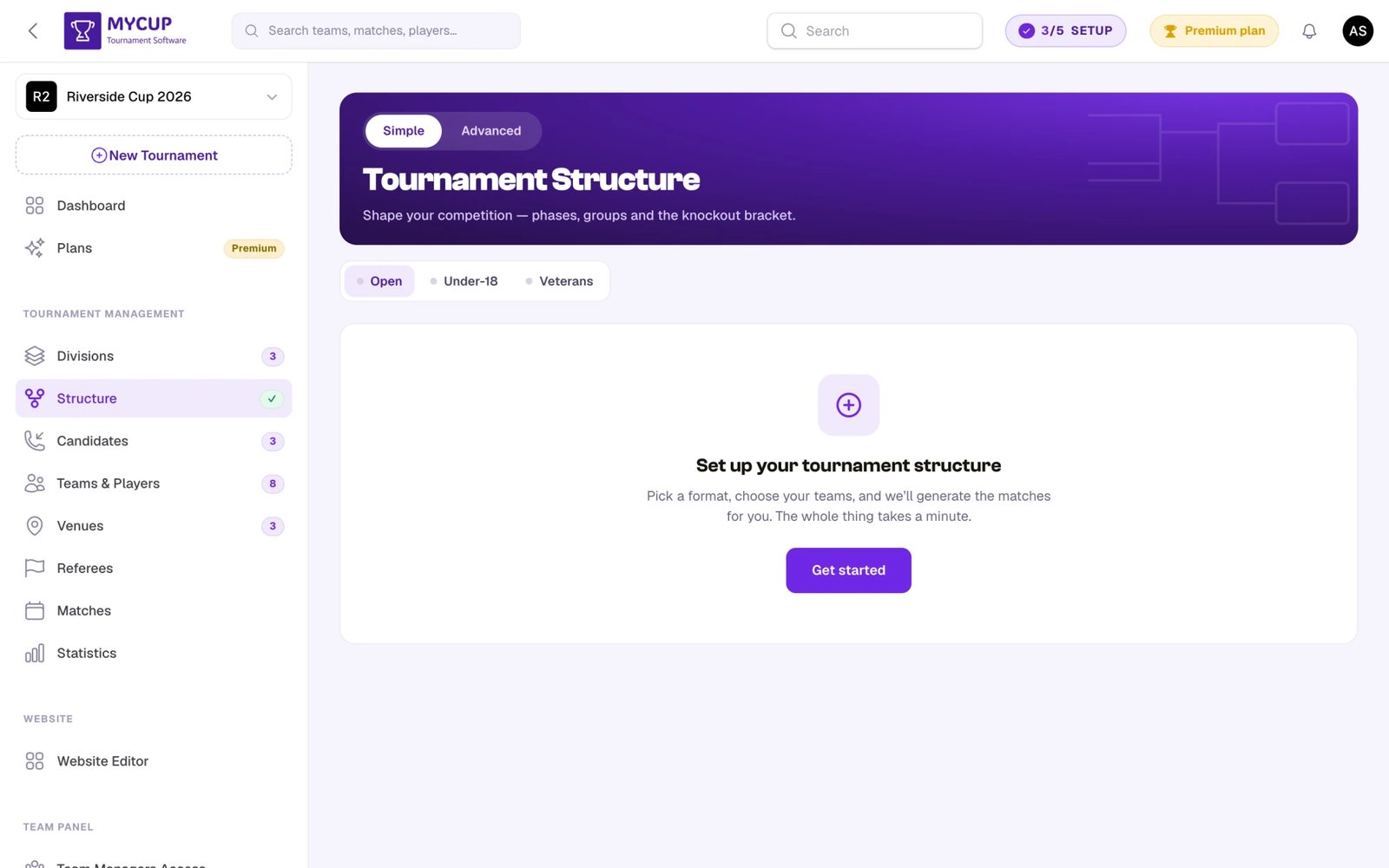
All matches are produced here. Building your structure generates the matches — via the guided setup's Build tournament step (with Generate matches now left on) or, in Simple view, the Save & generate button. If the structure changes later, rebuild them with the Regenerate button, which carries an Outdated badge once matches have drifted from the current structure. There is no separate matches-creation flow elsewhere in the app.
Key Components#
Phases#
Phases are the foundational building blocks of your tournament structure. You can add multiple phases of different types based on your needs. Phases can be renamed via settings to match your tournament terminology.
Two main phase types:
-
Groups | League - Ideal for leagues or group stages. Supports single leagues or multiple group stage configurations with individual customization options.
-
Knockout | Single Match - Perfect for knockout games or standalone matches. Configure automatic team progression to advance winners to subsequent rounds, or use manual assignment for flexibility.
Settings#
Each phase, group, or round includes settings functionality that enables individual renaming and configuration to customize elements independently.
Draw Participants#
A feature allowing team assignment through a dedicated draw function accessible via button for groups/leagues and knockout rounds.
Automatic Team Progression#
MyCup can automatically advance teams between phases based on match results. See the Automatic Team Progression guide for detailed information.
Key capabilities:
- Group to Knockout: Teams qualifying from group stages (1st place, 2nd place, etc.) automatically advance to designated knockout slots
- Knockout to Next Round: Match winners automatically advance to the next round
- Real-time Updates: Teams are assigned immediately when matches are completed
This eliminates manual work and ensures accurate progression based on actual results.
Carry-Over Results#
A group stage that follows another group stage can carry results over instead of starting from zero — open the later stage's settings (gear icon) and pick an option under Carry over results:
- Results between teams from the same group — teams that already met in the same earlier group don't play again; that result counts in the new table (intermediate rounds).
- Full record from the previous stage — every earlier game counts and the table simply continues (a league split into championship and relegation rounds).
See the Carry-Over Results guide for step-by-step examples.
Teams Still Level After Every Tiebreaker#
When a finished group has teams level on every tiebreaker, record how it was settled (penalty shootout, drawing of lots or your decision) from Ties to decide on the Matches page. The next round waits for it. See Deciding Level Teams in a Group.
Guided Setup#
When a tournament has no structure yet, the Structure page offers a guided setup wizard — the fastest way to build one of the popular formats without configuring phases and groups by hand. Click Get started (or Guided setup) on the empty state to open it.
The wizard walks you through a few steps:
- Choose your tournament format:
- League — one table, everyone plays everyone
- Knockout — a single-elimination bracket to a final
- Groups + Knockout — a group stage followed by a knockout bracket
- Who's playing? — fill the structure with your registered teams, or reserve empty slots to assign later
- Placement (when using registered teams) — drop them in with a random draw or alphabetically
- Review & build — check the summary, optionally leave Generate matches now on, and click Build tournament
This is perfect for:
- First-time users getting started quickly
- Standard tournament formats without custom requirements
- Testing tournament structures before customizing them
After building, you can still modify phases, rename them, adjust settings, and reshape the structure. Use the Reconfigure button to rerun the wizard, or Start blank to hand-build a structure phase by phase.
Saved Formats#
Built a structure you want to use again? Click Save as format in the header to store its shape — phases, groups, bracket, scoring and progression wiring — under a name of your choice, then Use a saved format to apply it to another division or to a whole new tournament next season. Teams, matches and results are never carried across; only the shape is.
Formats belong to your account rather than to one tournament, so a format saved from a finished edition is still there when you set up the next one. See the Saved Formats guide for the full workflow, including what gets replaced when you apply one.
Simple and Advanced views, and match generation#
The Structure page has two views, switched from the tabs at the top left:
- Simple (the default) — a streamlined builder. You arrange the whole structure as a draft and click Save & generate; matches are always rebuilt when you save. There's no separate regenerate step to think about.
- Advanced — the full builder, with per-phase and per-group settings, a Rules modal, and an Auto / Manual toggle that controls when matches are (re)built.
In both views your edits are collected into a draft — nothing is written until you press the save button, and leaving the page discards unsaved changes.
Auto vs Manual (Advanced view)#
The Auto / Manual toggle lives in the bar just below the hero in Advanced view. The choice is per-tournament and persists across sessions.
- Auto — the save button reads Save & generate, so matches rebuild every time you save the structure. Best while you're still setting the tournament up.
- Manual (the default in Advanced view) — the save button reads Save, so edits save instantly without touching your matches. You rebuild on demand with the Regenerate button, which shows a gold Outdated badge once the matches have drifted from the current structure. Best once your matches carry scores, dates, or venues you don't want overwritten.
What changes in Manual mode#
| Behaviour | Auto (and Simple) | Manual |
|---|---|---|
| Saving structure edits | Rebuilds matches (Save & generate) | Just saves — matches stay untouched |
| Rebuilding matches | Happens on save | On demand via the Regenerate button |
| Outdated badge on Regenerate | n/a — matches are always current after save | Appears when edits are pending a rebuild |
| Automatic team progression | Resolves slots and updates matches in place | Same — progression is independent of this toggle |
| Set teams on a match row (Matches page) | Hidden | Available — click a team name to swap or reassign; the modal also has a Swap home ⇄ away link |
Auto-source slots (e.g. "Winner of Group A") keep working regardless of this toggle: the slot resolves the moment the source phase finishes, and the team reference on the affected match updates without a full rebuild. If you manually override a side fed by an auto-source, the slot link is detached so the progression can't undo your choice later.
Rule of thumb: stay in Simple (or Advanced + Auto) while you're still placing teams; switch to Advanced + Manual once the schedule is published and you only want to make targeted edits.
Tournament Structure Examples#
League Format#
Single group round-robin where all participants play against each other in one or multiple groups.
Best for:
- Regular season competitions
- Community leagues
- When every participant should play multiple matches
How it works:
- Create a single phase with Groups/League type
- Add one group (for simple league) or multiple groups (for divisions)
- Assign participants to groups
- Configure points system and rounds
Cup Format#
Pure knockout progression where participants advance through elimination rounds.
Best for:
- Cup competitions
- Weekend tournaments
- Time-limited events
How it works:
- Create a single phase with Knockout/Single Match type
- Configure bracket size and rounds
- Assign participants (seeded or random)
- Winners advance manually or automatically to next rounds
Group Stage + Playoffs#
Combined format with initial group stage followed by knockout rounds for top performers.
Best for:
- Professional-style tournaments
- World Cup or Champions League formats
- Large competitions with multiple stages
How it works:
- Create Phase 1: Groups/League (multiple groups)
- Assign participants across groups
- Create Phase 2: Knockout/Single Match
- Define advancement rules (top N from each group)
- Top teams from groups advance to knockout phase
Group Stage + Intermediate Round#
Two group stages back to back, where teams that already met don't play each other again.
Best for:
- One-day youth festivals with many teams and few time slots
- Formats where the top two of each group regroup before the finals
How it works:
- Phase 1: Groups/League (e.g. 8 groups of 4)
- Phase 2: Groups/League (e.g. 4 groups of 4), slots wired to 1st/2nd from Group A and B, and so on
- In Phase 2's settings, set Carry over results to Results between teams from the same group — the A1–A2 result from Phase 1 counts, and that pairing isn't replayed
- Phase 3: Knockout for the placings
League Split (Championship and Relegation Rounds)#
A regular season followed by a split, with the whole table carried into the second round.
Best for:
- National-style leagues such as the Cypriot First Division
- Any league where the top half plays for the title and the bottom half against relegation
How it works:
- Phase 1: one league group (the regular season)
- Phase 2: two groups — Championship wired to 1st–6th, Relegation wired to 7th–12th
- In Phase 2's settings, set Carry over results to Full record from the previous stage — points, goals and head-to-head continue from the regular season
Tournament Rules: Global Scoring & Standings#
Most tournaments use the same scoring everywhere — 3 points for a win, goal difference as the first tiebreaker, and so on. Rather than set that on every group and round, you define it once for the whole tournament and let each group or round inherit it.
Switch the Structure page to the Advanced view (top-left toggle) and click Rules in the header. The Tournament rules modal has two tabs:
Standings tab — sets the tiebreaker order used to rank teams on equal points, applied to every group-stage and league table in the tournament. Points is always first (pinned, marked ALWAYS FIRST); order the rest as you like (goal difference, goals scored, head-to-head, etc.), add or remove criteria, and click Save rules. Standings recalculate immediately. The list ends with a fixed Still level step (ALWAYS LAST): teams level on every criterion when the group ends are decided by a penalty shootout, drawing of lots or you, and you record it on the Matches page. See Deciding Level Teams in a Group.
Scoring tab — sets the tournament-wide format and scoring defaults that new groups and rounds inherit, grouped by topic:
- Format — round-robin vs. custom match days and matches per pair (group/league stage), and the number of matches in a knockout pair (best-of-N). Changing a format default flags inheriting groups/rounds for match regeneration, so the modal warns you here — avoid changing it once the tournament is underway.
- Group & league stage scoring — points for win / draw / loss, plus optional extra-time and penalty points.
- Knockout & single match stage scoring — wins needed to decide a tie, extra time and penalties (every match or final only), and the away-goals rule.
These are defaults: existing groups and rounds keep whatever they already have.
Inheriting or overriding per group/round#
Open any group or round's settings (gear icon) in Advanced view. At the top of the settings is a Use tournament defaults checkbox:
- On (the default for new groups and rounds) — the item inherits the tournament-wide format and scoring live. Change a value in Tournament rules and every inheriting group/round updates automatically. The format and scoring fields are hidden because they're managed globally; the item keeps its own stored values untouched, so switching back to custom restores exactly what you had.
- Off — the item uses its own values. Uncheck the box and the fields appear (Format, Points, Additional time, Penalties), grouped by topic, so you can customize just this group or round — for example, make only the final a best-of-three series, or decided by penalties.
This keeps the common case effortless (set format and scoring once, everything inherits) while still letting one group or the final use different rules.
Changing an inherited format value (round-robin, match days, matches per pair, best-of-N) affects how matches are generated, so inheriting groups/rounds are flagged for regeneration. Regenerating replaces existing matches — avoid format changes once results have been entered.
Configuration Features#
Flexible Phase Structure#
You can configure complex tournaments with unique settings for each phase. For example:
- Set most knockout rounds as best-of-two series
- Designate the final as a single match
- Use different points systems for different groups
- Configure custom advancement rules between phases
Independent Phase Settings#
Each phase operates independently with its own:
- Name and display options
- Points calculation rules (for group phases)
- Match format settings (for knockout phases)
- Participant assignment and seeding
Custom Points and Rules#
These settings live on each group/round and apply only when Use tournament defaults is turned off for that item (see Tournament Rules: Global Scoring & Standings above). Leave it on to inherit the tournament-wide defaults instead.
Groups/League phases:
- Customize points for wins, draws, and losses
- Set different points for specific matches
- Configure tie-breaker rules
- Choose between shared or separate standings tables
- Carry results over from the previous group stage (Carry-Over Results)
Knockout phases:
- Single elimination or best-of series
- Home and away legs
- Overtime and penalty rules
- Third-place playoff options
Multi-Division Tournaments#
For larger competitions, MyCup supports multiple divisions within a single tournament. Each division operates as an independent competition with its own phases, groups, and matches.
Division Structure#
Each division contains:
- Its own set of phases (group stage, knockout, etc.)
- Dedicated participant pool
- Independent standings and results
- Separate match schedules
Division-Specific Team Management#
When working with multi-division tournaments:
Team Assignment:
- When manually assigning teams to groups or matches, only teams belonging to that division are shown
- This prevents accidentally assigning teams to the wrong division
Draw Feature:
- The Draw Participants feature only shows teams from the current division
- Random assignment stays within division boundaries
Automatic Progression:
- Teams from Division A groups advance to Division A knockout rounds
- Teams from Division B groups advance to Division B knockout rounds
- Cross-division progression is handled separately if needed
Setting Up Divisions#
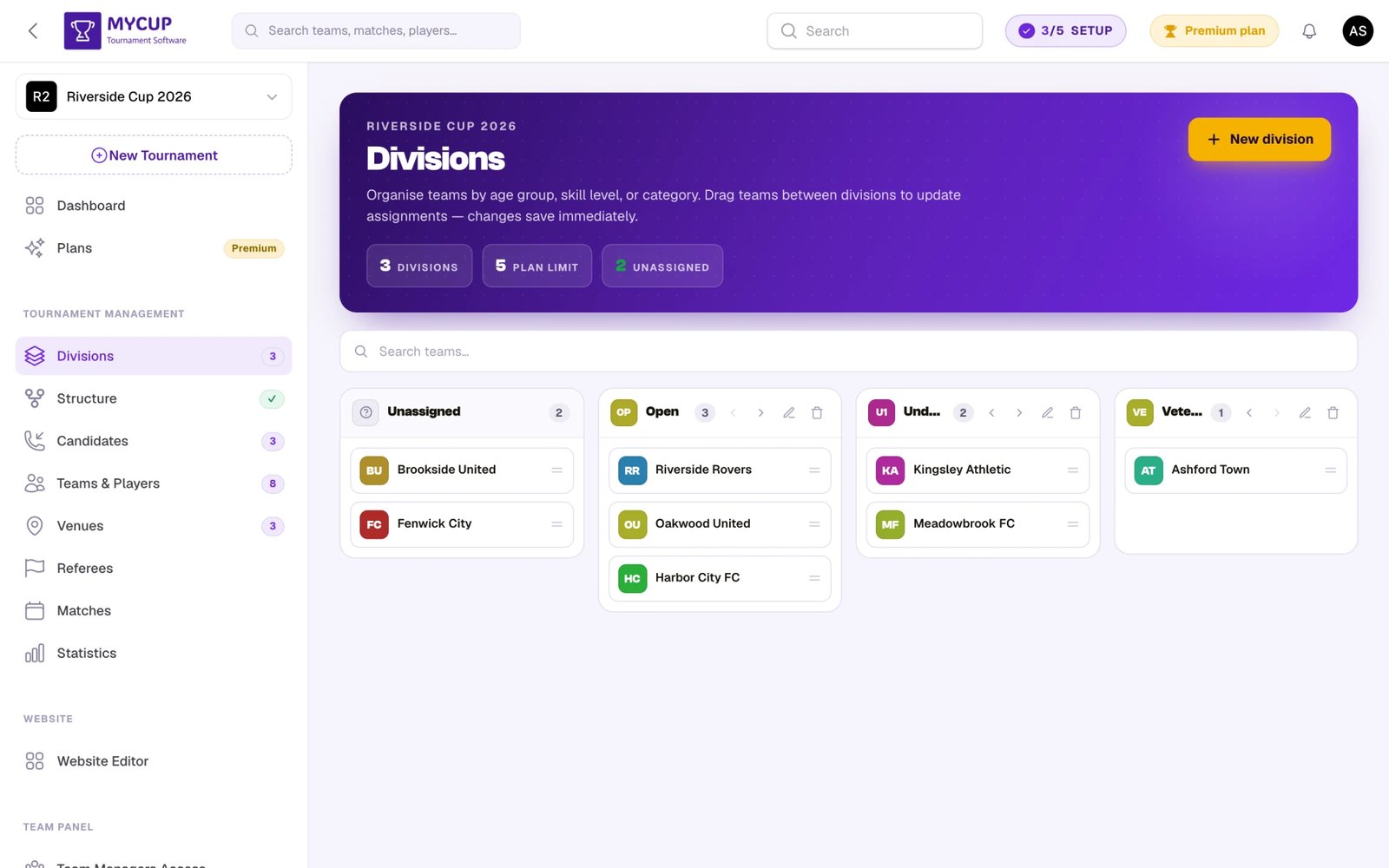
Divisions are managed on their own Divisions page (under Tournament Management in the sidebar) — a drag-and-drop board with a column per division plus an Unassigned column. Divisions are a Premium feature.
- Open the Divisions page and click New division to create one; name it (e.g., "Men's Division", "Premier League", "Age Group U18")
- Drag teams into the division they belong to (or use the Unassigned column for teams not yet placed)
- Go to the Structure page — each division now appears as its own tab at the top
- Pick a division and build its phases, groups, and bracket independently
- Repeat for additional divisions
Each division operates independently, making it easy to manage complex multi-division competitions.
Calling them something other than "divisions"#
Most organisers don't use the word division. A youth festival runs age groups, a schools competition runs categories, a swim meet runs pools, and a Portuguese club says escalão.
The Divisions page carries a What you call them control in its header. Pick the word there and it changes everywhere at once: the sidebar item and page title, every filter and column, the import template's column heading, the registration form, the candidate emails your clubs receive, and your public website.
Choose from Division, Age Group, Category, Group, Pool or Tier. It's a fixed list rather than free text because the word has to be translated into every language your panel and your website run in — a word you typed would stay English for a Spanish visitor.
It sits on the Divisions page rather than in Tournament Settings because that's the page the word is all over — you notice you want to change it exactly when you're looking at a board calling your age groups "divisions".
Grouping divisions: U10 Gold, U10 Silver, U11 Gold…#
If you run the same levels across several age groups, your divisions list can reach twenty-one entries that all repeat an age group in their name. Division groups add one optional container layer above them, so visitors pick the age group first and then the level inside it.
You can create them one at a time, or generate a whole age-group × level grid in one press. It's an advanced layer that stays completely invisible until you switch it on — see the Division Groups guide.
With only one division, the division UI disappears#
If your tournament has one division or none, MyCup hides every trace of divisions: no column on your team and candidate lists, no filter, no chips, no Division column in import templates, no division picker on the registration form, and nothing on your public website.
This is deliberate, not a bug to report. When every team is in the same division, a column repeating that same value on every row is pure noise. Create a second division and all of it reappears on its own — nothing to switch on.
It's driven purely by how many divisions you've actually created, never by your plan. If a Premium tournament's plan lapses, the divisions you already built keep showing exactly as they did.
Best Practices#
Start Simple
- Begin with a basic structure and add complexity only if needed
- Test your structure with a few participants first
Plan Before Generating Matches
- Place participants into groups or bracket slots first — empty slots will be skipped
- Review group settings and points rules before you build or save the structure
- After generating, structure edits can be applied with the Regenerate button — a confirmation lists any matches with entered scores before they're replaced
Use Phase Settings
- Rename phases to match your tournament (e.g., "Quarter Finals" instead of "Round 3")
- Configure each phase independently for maximum flexibility
- Test advancement rules to ensure they work as expected
Consider Your Participants
- Balance fairness with excitement
- Ensure everyone gets enough matches (for leagues)
- Plan for withdrawals or no-shows
Next Steps#
Once your tournament structure is configured:
- Place participants — use Draw teams for automatic seeding, or assign teams to groups and bracket slots manually
- Configure progression — set up automatic team progression so winners advance between phases without manual reshuffling
- Generate matches — build or save the structure (or click Regenerate after changes); the schedule appears immediately and can be edited from the Matches page
- Fine-tune settings — points rules, tiebreakers, knockout legs, and display options live in each phase's settings
- Pick how matches regenerate — stay in Simple (or Advanced + Auto) while you're still placing teams; switch to Advanced + Manual once the schedule is published and you only want targeted edits
- Save the shape for next time — click Save as format so you can rebuild the same competition in another division or next season (Saved Formats)
- Review the full flow before kick-off
Your tournament structure is the foundation of your competition. Take time to plan it well, and everything else will flow smoothly!
Was this page helpful?
Let us know if you found this documentation helpful or if you have suggestions for improvement.