
Rooming Lists
Open in StudioOn this page
Every property wants the same file before you arrive: which named person is in which room, with their date of birth and ID number. This page builds that file — and most of it from work you have already done.
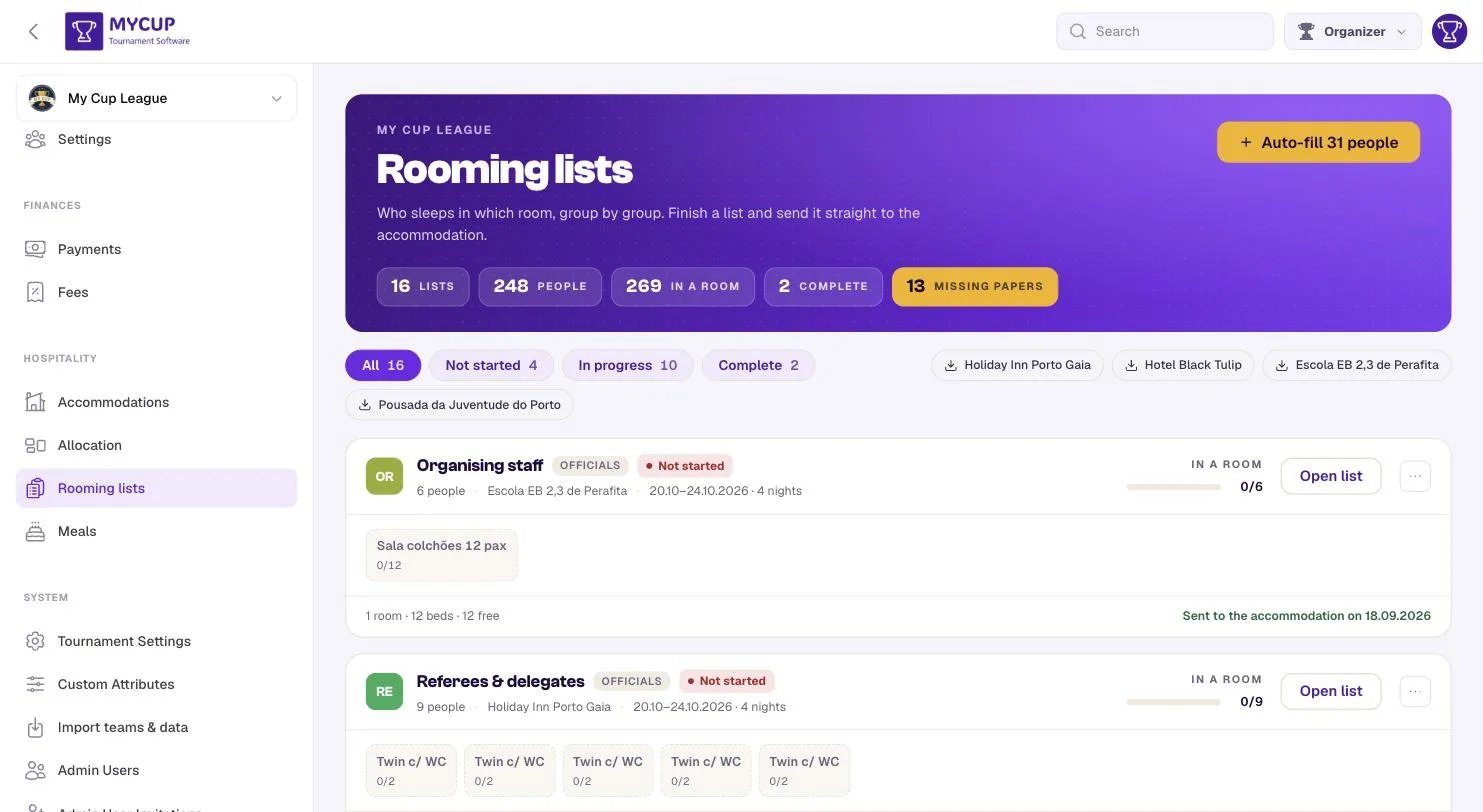
One card per stay#
A rooming list is a club's document — the thing a manager fills in and a property reads — so there is one card per group, not one per hotel. Unfinished lists come first, because this page is a chase list.
Each card shows the group, where and when they are staying, how far the list has got, and its rooms as tiles.
Where the rooms come from#
You do not create rooms here. When you book a group into an accommodation, MyCup creates one room per unit you took: a group that booked 8 twins gets 8 twin rooms waiting to be filled. The rooms are there from the moment the booking is saved, before anybody opens the list. Change the booking and the rooms follow: take more and empty rooms are added; take fewer and empty rooms go, but a room with people in it is never removed. A group booked by the bed — at a school or pavilion — gets one Dormitory entry that takes as many people as the beds it booked.
When a group moves to another accommodation#
Empty rooms at the old property simply go. A room that already has people in it is kept, because deleting their names and passport numbers is not a side effect of changing a hotel — but it is no longer part of the new property's list. It is left out of that property's sheet, out of auto-fill and out of the club's own page, so the new hotel is never sent details typed for the old one.
The group's card says how many rooms are left over, and the list shows them under From the previous accommodation. The people in them are offered again for the new rooms: seat them there, then press Remove this old room. It asks first, says how many people are still in it, and removes the room and those entries together.
Filling every list in one press#
Auto-fill N people takes the squad lists your clubs already typed and seats them in the rooms that club holds.
N is how many people a press would actually seat: squad members not yet on any of the club's lists, up to the free beds in the rooms it holds. Someone already on the list under the same name — typed in by hand or imported from the club's sheet — is not counted again, and nor is anybody beyond the beds the club booked. A club split over two bookings is seated once, not once in each.
It is safe to press at any time:
- It never moves anybody already in a room. A rooming list is negotiated — roommates are requested, a coach takes the single, two players are kept apart on purpose. It only ever fills empty places, so pressing it after an afternoon of hand-editing adds the people still missing instead of starting again.
- Press it twice and the second press does nothing.
- It names anyone it could not seat. If a club has more people than beds, you have to take another room or move somebody, and neither is MyCup's choice to make.
- Groups with no participant behind them are left alone — families and the referee pool have no squad list, so you name those by hand.
Reading a card#
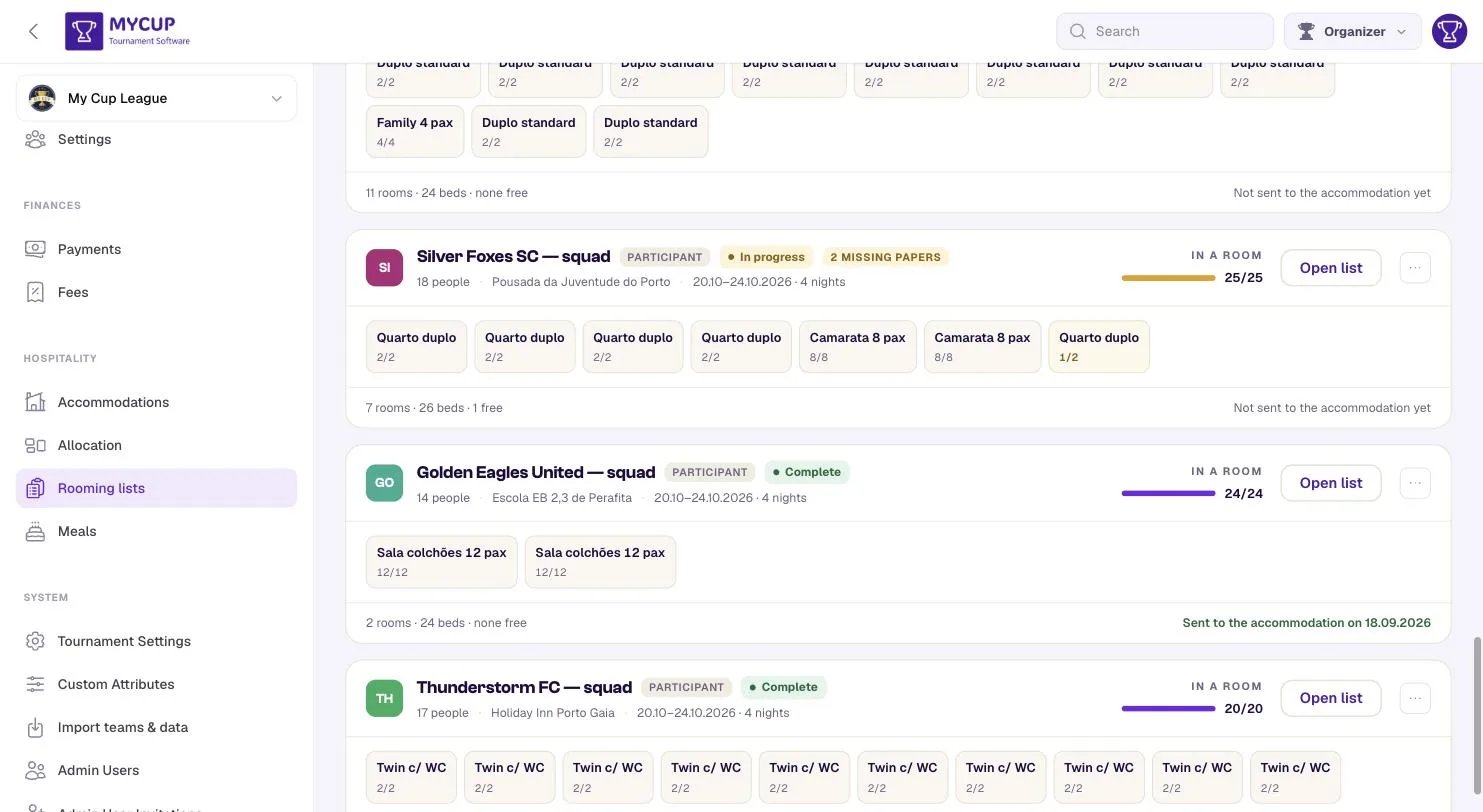
In a room is measured against people, not beds. A club of 22 in 24 beds is finished at 22 — a bar stuck at 92% would read as unfinished work when there is nothing left to do.
The room tiles say it faster than a table would:
| Tile | Meaning |
|---|---|
| Plain | Full |
| Amber | Part filled — 1/2 |
| Dashed | Nobody in it yet |
Not started means nobody is seated yet, even if the rooms exist. Complete means everybody is seated and nobody is missing paperwork.
"Missing papers"#
The gold figure in the header, and a badge on any card it applies to.
This is the most useful number on the page. An incomplete rooming list is not rejected by MyCup — it is rejected by the property, usually by email, usually on the Thursday before the tournament. Seeing it three weeks out is the entire point.
Auto-filled people usually start out incomplete: MyCup copies across the name, nationality and date of birth it already holds, but an ID number is something only the club can give you.
A person counts as missing papers when their name, date of birth or ID number is empty. An ID number that MyCup can no longer read back is treated as empty too: the person shows as missing papers instead of the page failing to open, and the number has to be entered again.
Opening a list#
Open list shows the rooms and who is in them: each person's name, nationality and date of birth, with incomplete beside anyone missing papers. The columns line up from room to room, so the whole list reads as one table. A line at the top says how many people are still missing a passport number or date of birth.
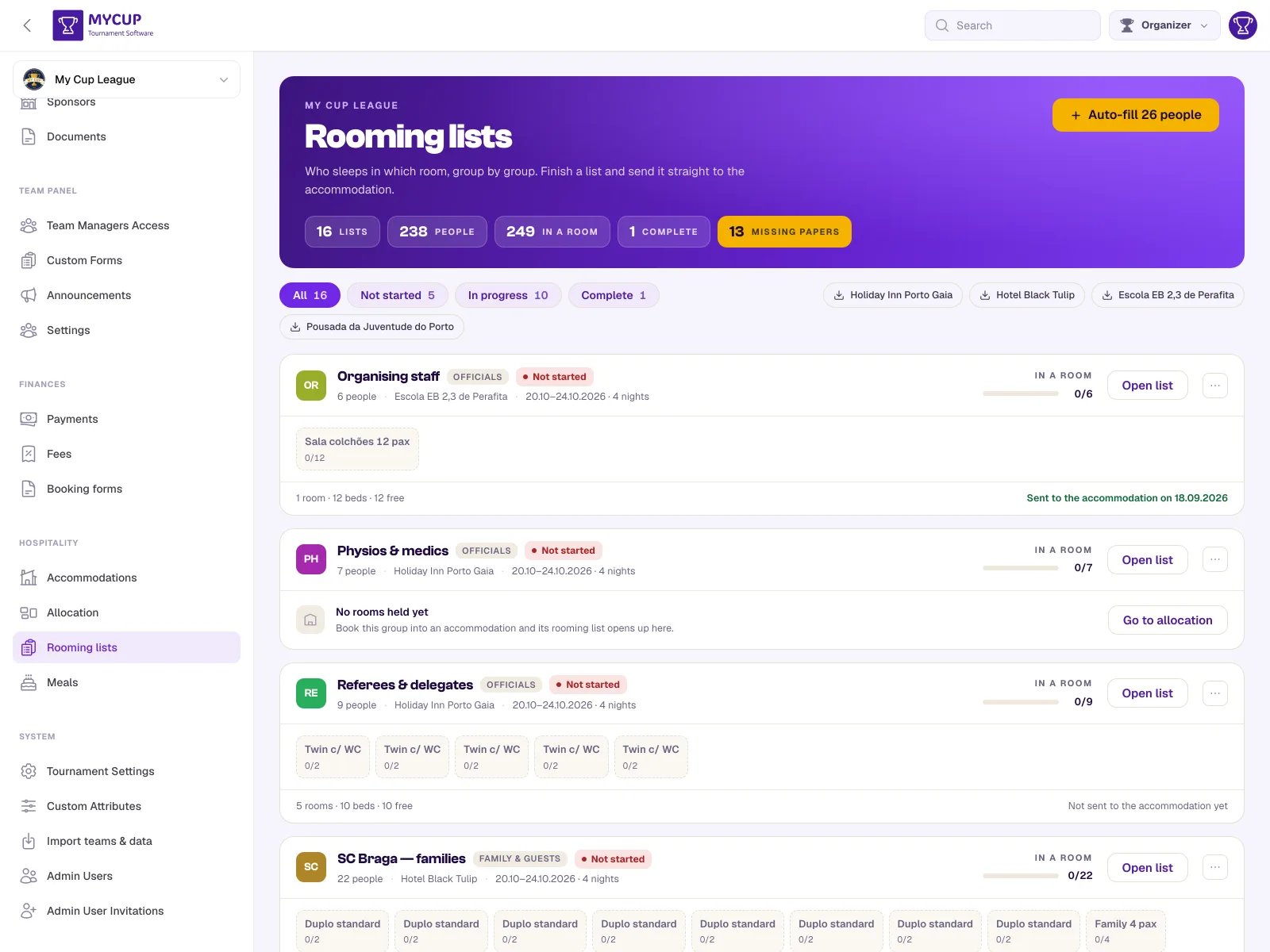
On this page you fill a list with Auto-fill, by importing the club's sheet (below), and by removing people who should not be there. Seating people by hand — picking players and staff from the club's squad, or adding a guest by name for a parent or a driver — and typing in ID numbers happens in the Team Panel, where the club's team manager completes their own list.
A room will not accept more people than its type sleeps. A property cannot put three people in a twin, and a list that claims otherwise is rejected at the front desk, not by us.
Fixing a list#
Open a list and each person has an ✕ beside them. It frees that place without touching the rest of the list — auto-fill will put the next person in it.
Worth knowing, because both of the things that fill these lists get people wrong: auto-fill seats whoever is on the squad sheet, and the importer seats whoever was in the spreadsheet. Before this, correcting one person meant deleting the booking and starting the list again.
Importing a club's sheet#
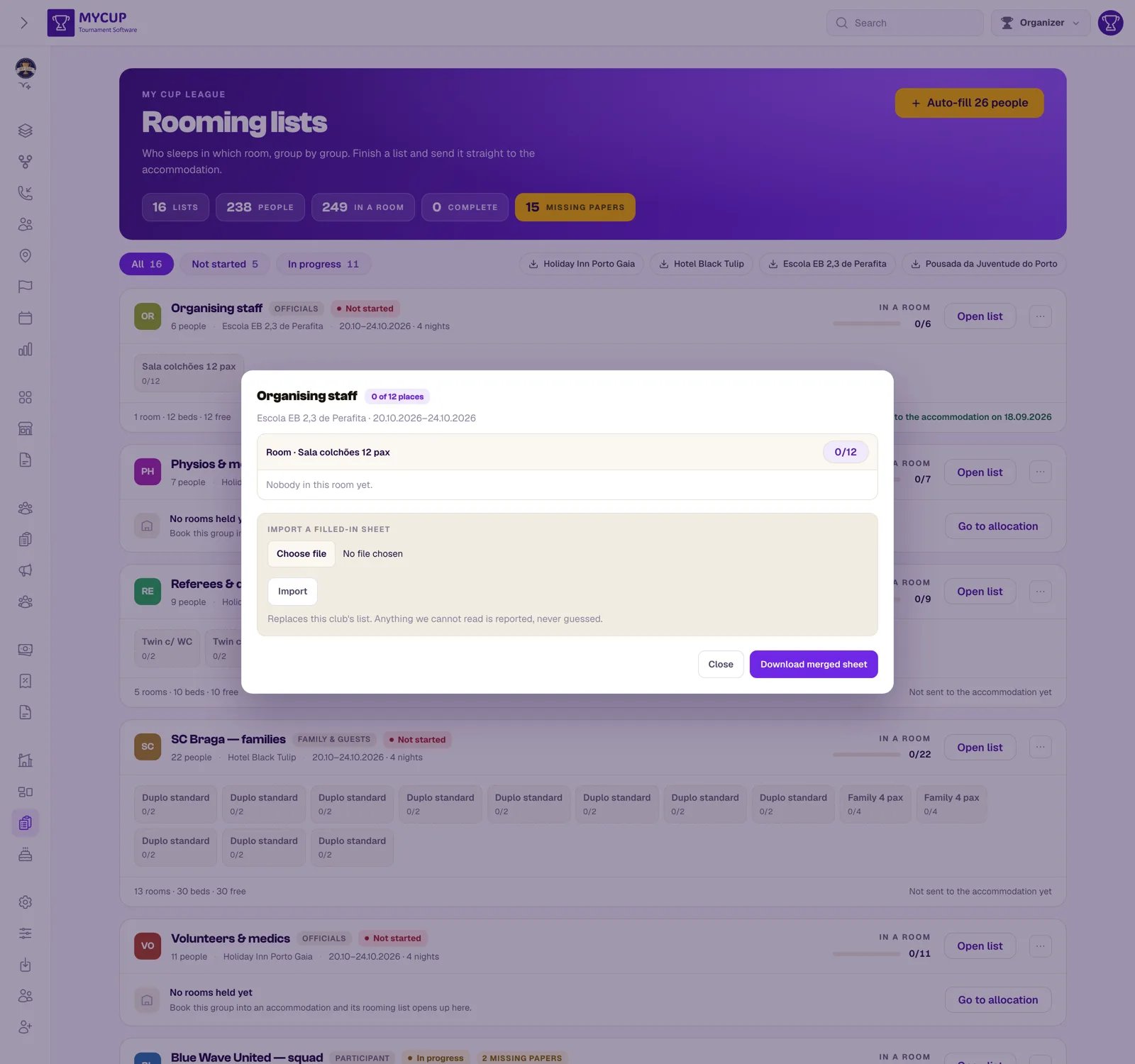
If a club emails the sheet back filled in, you do not have to retype it. Open their list and use Import a filled-in sheet — it takes the .xlsx or .csv and reads the columns whatever language they are in, so the Portuguese export imports into an English session.
It replaces that club's list rather than merging into it, and anything it cannot read is reported rather than guessed: an unknown room type, a name it could not make out, a room already full. You see the list of problems and fix those by hand. A visible gap beats a hidden misfiling.
Sending it#
The buttons on the right of the filter row download one sheet per accommodation — covering every club staying there, which is what a property wants: their front desk thinks in rooms, not in clubs.
Downloading is not sending. When you have actually handed the list over, use Mark as sent to the hotel on the row menu, and each card records it: Sent to the accommodation on 18.09.2026, or Not sent to the accommodation yet. That is a question — did we send Riverside's list? — that organisers used to answer by searching their own sent mail.
The two are separate on purpose. Previewing the sheet, or fetching it again to check a correction, is not a disclosure — and this date is the only record you have of when a register of passport numbers left the building. The first date is kept for the same reason: a corrected re-send is still the same disclosure, and a date that quietly rewrote itself would not be worth having.
Who can fill it in#
If you run the Team Panel, team managers can complete their own club's list — see Accommodation in the team panel for how to switch it on and what they see. That is usually the right division of labour: they know their squad's passport numbers and you do not. Your roster policy still applies.
About the personal data#
Rooming lists hold ID numbers and dates of birth, often of minors.
- ID numbers are encrypted in the database, not stored as plain text.
- They are purged automatically by a weekly job once the tournament is well over. "Over" means the last guest checked out — you do not have to remember to mark the tournament finished. If you do mark it finished, that date is used instead, because it is the more certain one.
- Dietary requirements go with them, including the ones assigned to players from your diet catalogue. They are the same kind of information wherever they are stored, so they expire on the same schedule.
Collect only what your properties actually require.
Next steps#
- Meals — count who is eating