
Accommodation
Open in StudioOn this page
Premium feature. Accommodation is part of Hospitality, available on the Tournament Premium plan.
A hotel will not check a group in on a list of first names. It wants a room-by-room breakdown with a passport or ID number and a date of birth against every person — and those are exactly the details the club holds and you do not.
This page hands that job back to the club. The manager seats their own squad, fills in the two fields the hotel asks for, and you watch the progress bars fill on your Rooming lists page instead of typing twenty-four names from an email thread.
Turning It On#
- Open Team PanelSettings and go to the Permissions tab
- Under What teams can manage, switch on Rooming list
- Click Save in the bar at the foot of the page
An Accommodation item appears in the team panel sidebar, under Stay & money.
The toggle only appears once your tournament actually houses somebody — a hotel switch on a tournament with no accommodation is a setting for a page that could never exist. It is off by default.
Who Sees the Page#
Three things have to be true, and a club failing any of them gets no menu item rather than an empty screen:
- your plan includes Hospitality,
- you have switched on Rooming list, and
- this club has a booking.
That last condition matters at a festival where only the travelling clubs are housed. A local side driving home each night has no use for a hotel page, so they never see one.
The same three things are re-checked on every save, not just when the page opens. If you switch Rooming list off, or your plan lapses, a manager who already had the page open cannot keep typing passport numbers into it.
What the Manager Does#
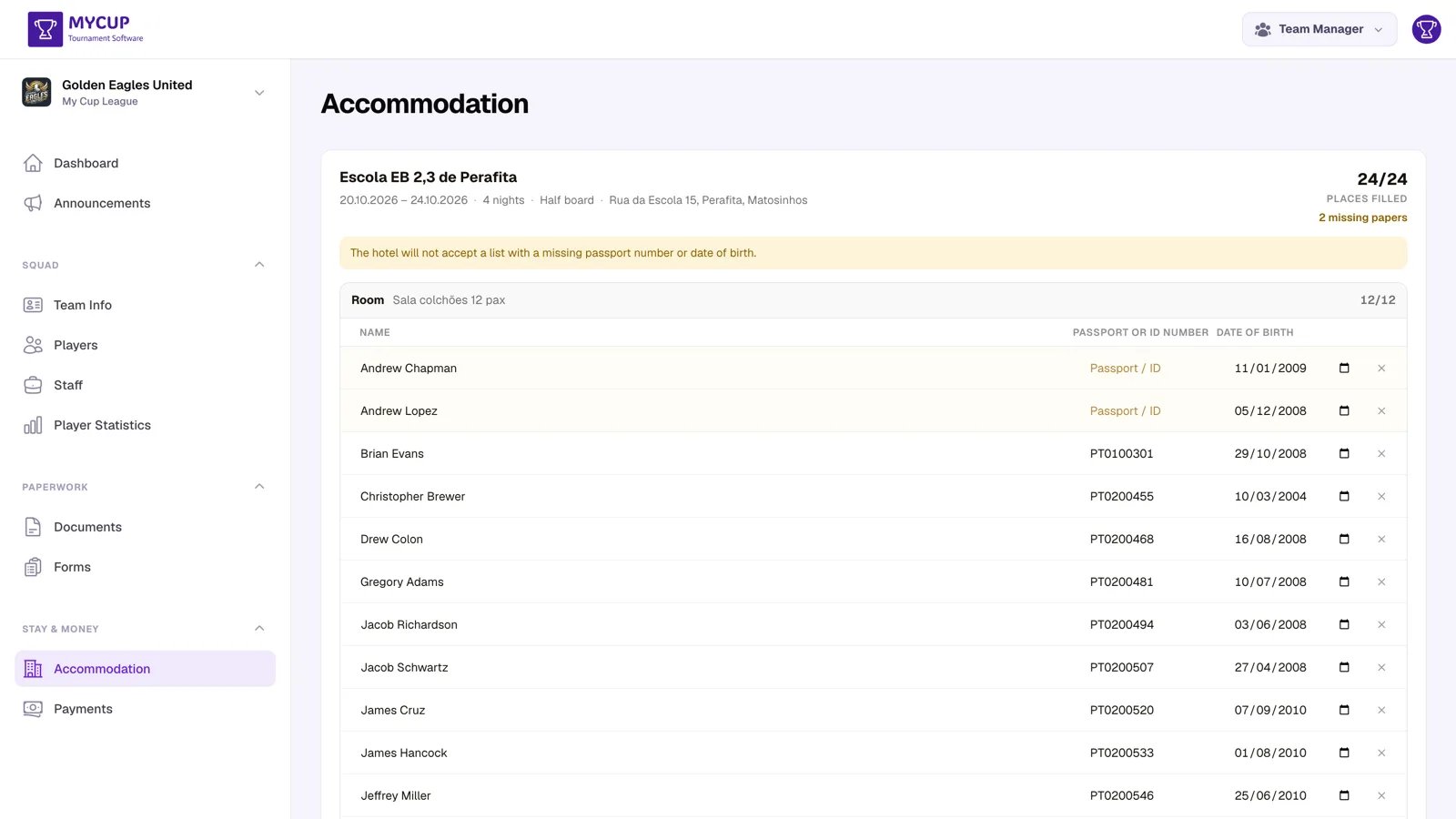
Each of the club's bookings appears as a card carrying the hotel, its address, the dates, the number of nights and the board basis, with a progress bar showing how much of the list is done.
Below it are the rooms you allocated, each with its room type and capacity.
Seating their own people. Clicking Add on a room offers the club's players and staff who are not yet in a room (From your roster). Picking one copies their name, nationality and date of birth straight off the roster, so the manager is left filling in a passport number and nothing else.
Anyone already seated drops out of the list. A picker that keeps offering a player who is in room 2 is how that player ends up in room 2 and room 5.
If you move the club to another accommodation, its page shows only the rooms at the new one. Anyone who was seated at the old property is offered again, so the manager can seat them in the new rooms; the old rooms are yours to remove from Rooming lists.
Guests. Not everyone travelling is on the roster — a parent, a driver, a physio arriving separately. The same Add dialog takes a free-text name for them (Or type a guest name).
Filling in the details. Each person's row has three columns: their name, Passport or ID number, and Date of birth. Anything still missing is marked Papers missing, and the booking card shows how many places are filled, so a manager can see at a glance what is left rather than counting.
Room capacity is enforced. A twin will not take a third person: the club is told the room is full. A hotel rejects an over-filled list at the desk, which is a far worse place to find out.
Meals Are Read-Only#
If you booked meals for the club, the page lists them under Meals booked for you — the day, the sitting, where it is served and how many people it covers.
The manager cannot change those numbers. A cover is a figure you have committed to a caterer, and a club revising it the night before is a conversation with you, not a form field. It is shown because "how many breakfasts did we book?" is otherwise a question that costs both of you an email.
Asking Clubs to Finish#
There is no automatic rooming-list reminder. Chase clubs with an announcement — "complete your rooming list before Friday 18:00" — and turn this setting on before you send it. An announcement asking somebody to do something the panel gives them no way to do is worse than sending nothing.
Your own Rooming lists page shows you who has finished, so you know who to chase.
Privacy#
Every club sees its own rooms and nobody else's. The page is scoped to the team behind the booking, not to the tournament, so one club can never see another's allocation — which is worth stating plainly, because these lists carry dates of birth and passport numbers.
You can also clear those details once the event is over. See Rooming lists for purging personal data.