
Transport
Open in StudioOn this page
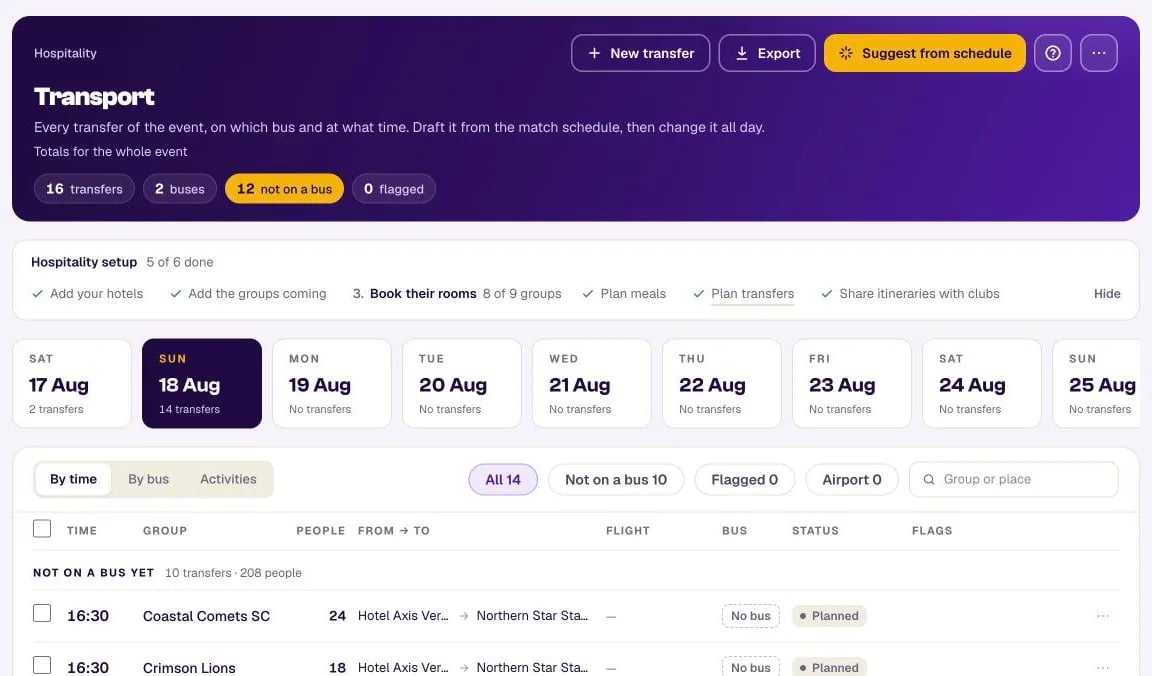
Transport is the event's bus schedule: every transfer (one group moved from one place to another), on which bus, at what time. You draft most of it from the match schedule in one press, then change it all day — because on a festival, something always moves.
The words#
- Transfer — one group moved from A to B: a date, a pick-up time (or TBA), how many people ride, where from and where to. Airport transfers also carry the flight.
- Bus — one bus for one day: a label (A, B, "ELMARBUS 1"), the driver and their phone, the operator and how many seats. The same letter can be a different bus with a different driver on another day.
- Group — the same groups you use on Groups & rooms. A club with an U15 and an U17 team is two groups; riding together is two transfers on the same bus at the same time.
- Place — anywhere a bus goes that is not one of your accommodations: the airport, a museum, a stadium for an activity. A site groups several match venues that share one entrance, so the bus stops once — a team is driven to "Estádio Universitário" and its itinerary still says "Field 4".
Days#
The tabs under the header are the event's days. Each one reads the weekday, the date, how many transfers it has and — in amber — how many of them carry a warning. They cover the busiest stretch of the event (up to 31 days), so one stray date far away cannot push the real event off the screen; if something is planned on a day outside that stretch, that day still opens with its own tab. The Activities view lists the whole event, so the day cards step aside there.
The figures in the header — transfers, buses, not on a bus, flagged — are totals for the whole event; the day cards and the filters below count the day you are on.
Suggest from schedule#
Press Suggest from schedule, tick the days, and MyCup drafts every team's match-day transfers:
- Hotelvenue about 90 minutes before the team's first kick-off;
- Venuevenue between two matches at different venues;
- Venuehotel after the last match ends (the match length comes from your venue availability).
It never changes a transfer you already have, never puts anything on a bus, and lists what it could not draft and why — "No hotel booking on 3 Apr", "Match has no venue yet" — with a link to fix each one. Run it again any time; it only adds what is missing.
When there is nothing to draft, the dialog says why instead of offering "Create 0 transfers":
- No day ticked — tick the days to draft for (days with matches are ticked for you);
- No group is linked to a team — transfers follow each team's matches, so add each club as a group on Groups & rooms and pick its team;
- No linked team plays on those days — pick other days, or check the match schedule.
The 90 minutes and the time after the match are yours to change: ⋯Transport settings.
Putting transfers on buses#
Three views of the same day:
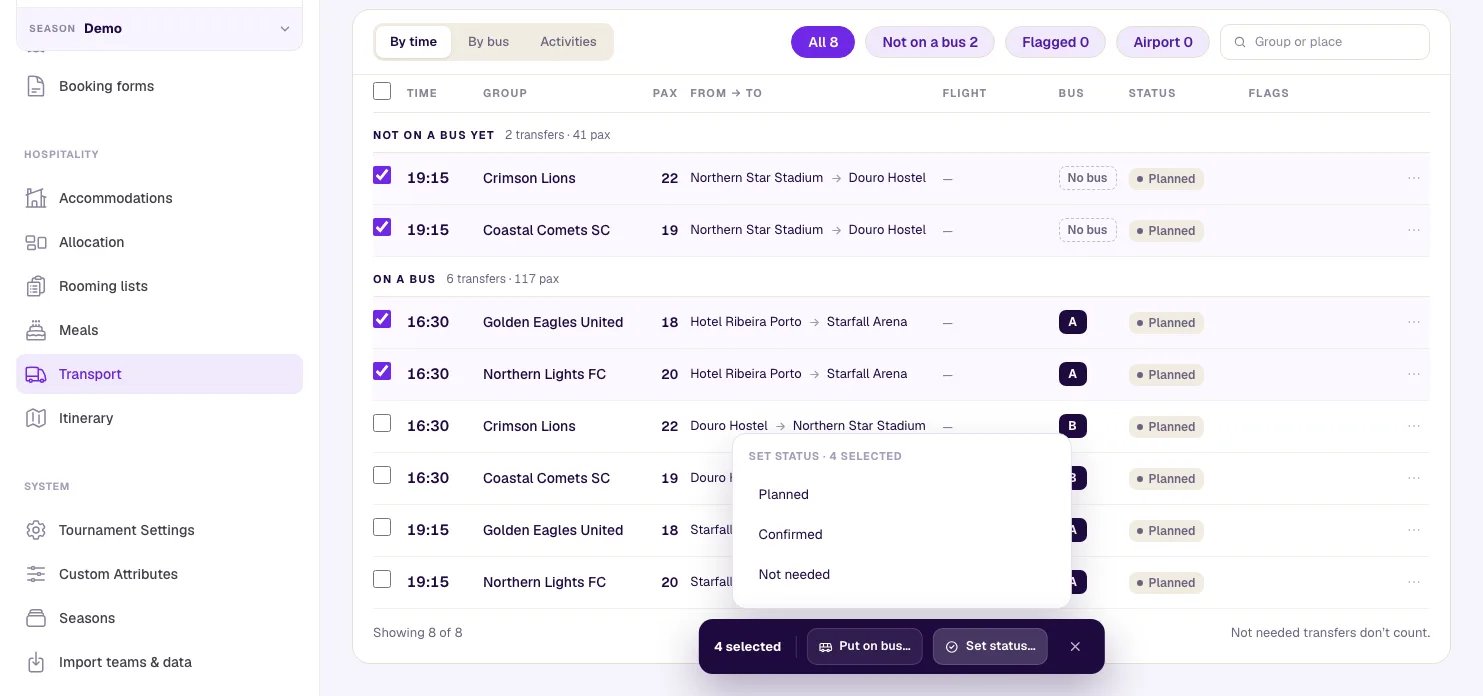
- By time — every transfer in time order, the ones not on a bus yet first. Tick some (or the box in the header for the whole day) and a bar appears at the bottom of the page:
- Put on bus… lists each bus of the day as free or busy around that time;
- Set status… marks them all Planned, Confirmed or Not needed at once;
- × clears the selection. Opening another day or view, a filter or a search drops the transfers it hides, so the bar only ever acts on transfers you can see.
- By bus — one card per bus with its trips, and Not on a bus yet on the right. On a computer you can drag a transfer onto a bus; every device also has ⋯Move to bus.
- Activities — see below.
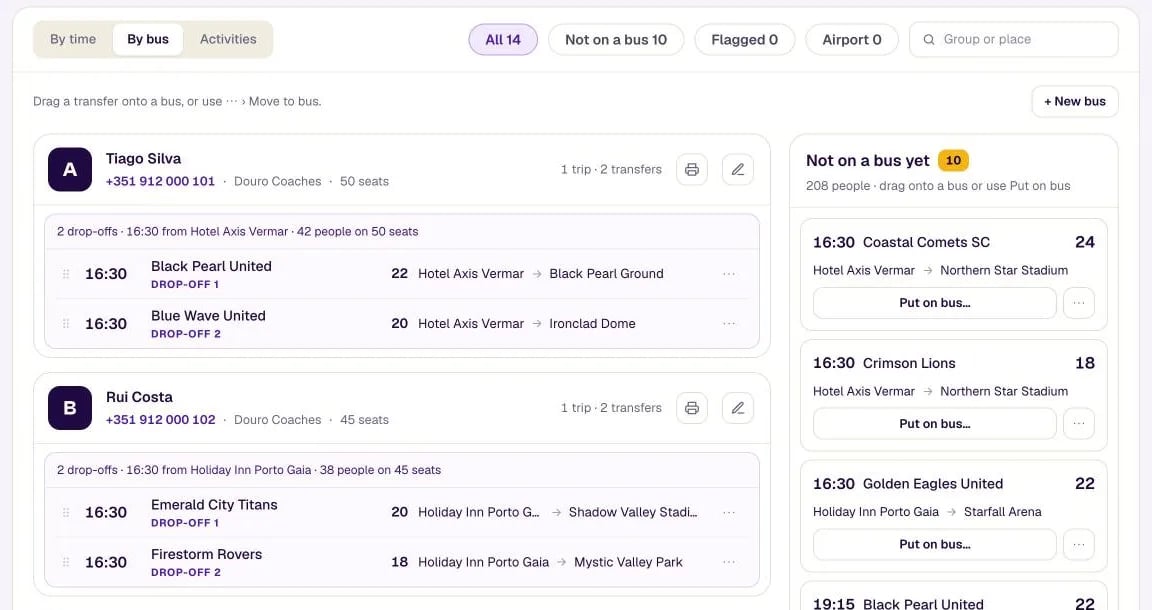
MyCup groups a bus's transfers into trips on its own: two groups from the same hotel at the same time are Together; the same pick-up going to two or more venues is 2 drop-offs (or 3, 4…); two hotels picked up within an hour for one venue is One trip · 2 pick-ups.
Warnings#
None of these stop you saving — they tell you what to look at:
| Warning | When |
|---|---|
| Over seats | A trip carries more people than the bus has seats |
| Bus in two places | One bus has two trips less than 30 minutes apart |
| No booking at this hotel | A group is picked up at (or taken to) one of your accommodations where it has no booking that night |
| Match moved | The match a transfer was planned for changed time or venue |
| Team no longer plays this match | The match's teams changed (a re-draw, a corrected result) and this group is no longer in it |
| Match removed | The match a transfer was planned for no longer exists |
| Place removed | The pick-up or drop-off place was deleted |
| No driver | A bus has no driver yet |
| Time TBA | The pick-up time is not set yet |
When a match moves, its transfers say so — "Match moved: 16:00 → 17:30" — and nothing changes on its own. Each banner names its transfer ("The transfer Hotel Ribeira → Oceanic Wave Park at 16:30 still has the old time"), so the drive there and the drive back can be handled one by one.
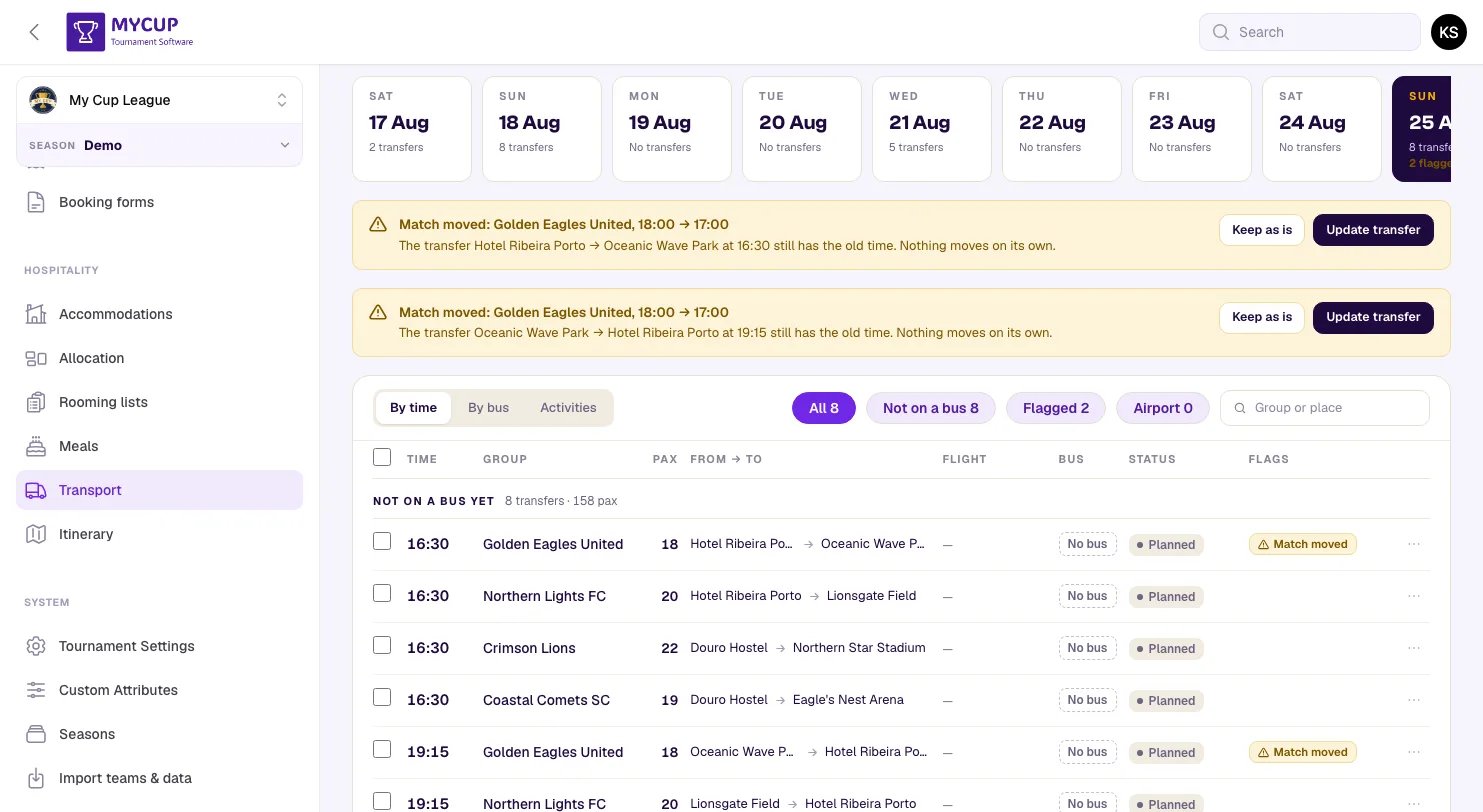
Update transfer applies the same rule to the new time; Keep as is keeps your time and clears the warning. When there is nothing to follow — the group no longer plays the match, the match was removed, or it has no kick-off time or venue any more — Update transfer refuses and says why, so edit the transfer or delete it.
Until you deal with it, a transfer for a match that moved, was removed or that the group no longer plays prints on the club's itinerary marked (to be confirmed).
A transfer nobody needed stays on the list as Not needed, struck through: it leaves its bus and never prints.
To keep a drafted transfer off the plan, mark it Not needed rather than deleting it: Suggest from schedule drafts a deleted one again the next time you press it.
A transfer's notes are for you and the driver: they print on the driver sheet and never on a club's itinerary.
Notes on a transfer, bus, activity or place, and a place's address, take up to 2,000 characters. A longer text is refused with a message, never cut short.
A transfer flagged No booking at this hotel offers Use hotel (the hotel the group is booked at) in its ⋯ menu and in its edit dialog, to switch the transfer to that hotel in one step.
Places#
⋯Places lists every place a bus goes that is not one of your accommodations. Sites group match venues that share one entrance, so the bus stops there once — for example Pitch 1 and Pitch 2 at the same sports park; with no sites, each venue is its own drop-off point. Other places are airports, stations, museums — anywhere that is not a hotel or a match venue. New place adds one — give it a map link and clubs can open it on their phone.
Open a place to rename it or delete it. Deleting asks first; transfers going there then show Place removed until you choose another place, and an airport transfer still reads as an arrival or a departure from its other end.
Airport transfers#
When one end of a transfer is an airport, the dialog asks for the flight number, where it comes from (or goes to) and the landing (or departure) time. For an arrival, the pick-up fills in 20 minutes after landing — time for passport control and bags — and you can change it.
Activities#
The FC Porto match, a river cruise, the awards ceremony: add them on the Activities tab with a date, a time (or TBA), a place and the groups they are for. They appear on those groups' itineraries. Each activity shows how many of its groups already have a transfer there, and Add transfers for these groups drafts the missing ones.
Driver sheets and the spreadsheet#
- ⋯Driver sheets prints one A4 page per bus for the day you are on: the driver, the trips in large type, who rides together, and your operations contact (set in Transport settings). Each bus card also prints its own sheet.
- Export downloads the whole plan as a spreadsheet laid out like the classic transfer sheet: a block per day, a block per bus, then what is not on a bus yet.
Drivers' phone numbers are shown here and on driver sheets only — never to clubs.